
FoxAlien Masuter Pro
4.2Editor score
All-metal frame and linear rail
Dual spindle clamp compatibility
400 by 400 millimeter workspace
Compare the best CNC router machine for woodworking, including work area, spindle power, precision, controls, expandability, and material versatility today.
A CNC router machine for woodworking can transform digital designs into precise carvings, panels, signs, prototypes, and cabinet components. A useful machine combines a rigid frame, dependable motion system, capable spindle, straightforward software, and enough working space for the projects you actually intend to make.
We compared these ten routers using working area, axis travel, spindle capability, drive components, frame rigidity, control features, supported software, expandability, and intended maker use. The list covers compact beginner systems, fully assembled desktop models, expandable hobby machines, and larger benchtop options for ambitious woodworking.
Each selection highlights a different practical advantage, from quick setup and affordable access to larger workpieces, stronger hardware, or rotary carving support. Product configurations, software compatibility, bundle contents, and listing details can change, so verify the current specifications and accessories before ordering.
4.2Editor score
4.4Editor score

4.2Editor score
This side-by-side comparison highlights each router's practical capacity, including workspace dimensions, spindle provisions, motion hardware, control approach, and the kinds of woodworking projects it is best suited to handle.


The FoxAlien Masuter Pro is a straightforward entry point for makers who want to move beyond hand-guided routing and begin cutting designs from digital files. Its 4.2 rating reflects a generally capable package, with the strongest appeal coming from an all-metal structure, a linear-rail Z-axis, and a relatively generous square work area for a beginner-focused router.
We may earn a commission when you buy through this link, at no additional cost to you.
The main parts arrive preassembled and prewired, which should shorten the path from unpacking to a first project. Its 400 by 400 by 60 millimeter working area provides enough room for signs, decorative panels, small furniture components, and routed test pieces. Two spindle clamps support 52mm and 65mm equipment, giving makers more flexibility than a package built around only one standard router size.
The trade-off is the shallow 60mm pass height. That is sufficient for many thin panels, templates, plaques, and small relief projects, but it may restrict thicker stock or tall three-dimensional forms. The listed support for a 65mm router and a 1.5kW spindle also depends on what is included in the current package, so buyers should confirm the exact bundle before purchase.
Choose the Masuter Pro when affordability, a manageable learning curve, and quick setup matter most. It is particularly suitable for first-time CNC users, students, and hobbyists who want a solid all-metal frame without beginning with a large-format system. For those needs, it stands out as the most budget-conscious option in this guide.
Preassembled components and prewired connections reduce the number of early troubleshooting tasks. The included step-by-step manual and stated 10- to 15-minute assembly target make this a practical choice for makers who want to begin cutting signs and test plaques quickly.
The included 52mm and 65mm clamps support several common spindle formats, while optional upgrades broaden the range of possible cutting tasks. A separately available Y-axis extension can also help users graduate beyond the original 400mm-wide work envelope.
We may earn a commission when you buy through this link, at no additional cost to you.
The FoxAlien Masuter Pro MAX is designed for makers who need more than a small learning router can comfortably offer. Its 4.2 rating is supported by a substantial 600 by 600 millimeter active area, 100 millimeters of Z-axis pass height, and a 500W brushless spindle built for extended routing and milling sessions.
We may earn a commission when you buy through this link, at no additional cost to you.
The strengthened X-axis aluminum extrusion is especially relevant when a machine works on thicker wood or completes longer jobs. Reduced vibration supports cleaner edges and more repeatable results, while the brushless spindle is described as quieter, more efficient, and longer-lasting than a conventional brushed motor. These characteristics suit sign makers, small workshop operators, and serious hobbyists.
Its most interesting feature is the dedicated A-axis interface. A rotary attachment can be connected without unplugging the Y-axis, simplifying the move from flat carving to cylindrical work such as tumblers, bats, and other round pieces. The redesigned control unit also offers a route toward higher-precision closed-loop stepper motors without requiring the entire control system to be replaced.
The Pro MAX makes the most sense for buyers whose regular projects exceed a 400mm square area or who want rotary capability from the outset. Its footprint and power requirements are greater than those of compact beginner routers, but the larger work area, stronger spindle, and dedicated rotary connection justify that trade-off for serious hobby work.
The 23.6-inch square active area can accommodate more substantial signs, panels, and multiple smaller parts than a typical desktop router. Pairing this footprint with 100mm pass height gives users more freedom when planning deeper cuts or taller material.
The independent fourth-axis port removes a common cable-swap inconvenience. Users can move between flat and cylindrical projects more efficiently, making the machine especially interesting for decorative vessels and repeated round objects.
We may earn a commission when you buy through this link, at no additional cost to you.
The FoxAlien XE-Ultra 8080 is the most expansive and premium-oriented option here, built for large benchtop work rather than compact hobby projects. It has a 4.2 rating and an ambitious 33 by 33 by 4.72-inch working area, accompanied by a stated 5.3-inch pass height for deeper material and more complex three-dimensional jobs.
We may earn a commission when you buy through this link, at no additional cost to you.
Its mechanical specification is the main attraction. Sixteen-millimeter ball screws on X and Y, 12mm ball screws on Z, HG-15 linear rails on every axis, and a 46 by 80mm aluminum frame form a rigid motion platform. NEMA 23 closed-loop motors provide 2.6 Nm of torque, while intelligent step-loss protection helps maintain accuracy at speeds up to 5,000 millimeters per minute.
The machine uses an open spindle ecosystem rather than bundling one motor. It supports 65mm routers, a FoxAlien 1.5kW VFD spindle, and FA20W, FA40W, or FA80W engraving modules, with a 65mm clamp included. That flexibility is useful for buyers who already own tooling, but it also means a spindle must be sourced separately and configured correctly.
Choose the XE-Ultra 8080 for large panels, complex furniture components, and production-oriented hobby or small-shop workflows where rigidity and capacity justify the machine's footprint. It is less suitable for a cramped desk or occasional sign-sized project. For serious large-format woodworking, its mechanical platform is the strongest in this roundup.
A 33-inch square active area is large enough to consolidate many tasks that would otherwise require several smaller cutters. The relatively deep pass height also supports thicker boards and more involved relief work.
Closed-loop motors and physical hard limits add safeguards for extended carving sessions. Diagnostic indicators in the 32-bit control box can also help identify motor or motion problems before a lengthy job is abandoned.
We may earn a commission when you buy through this link, at no additional cost to you.
The LUNYEE 3020 Nova is a compelling choice for users who want to start routing without spending an entire weekend on assembly. Its 4.2 rating reflects a well-equipped compact machine with an all-metal frame, 800W spindle, preconnected wiring, and a 300 by 200 millimeter working area.
We may earn a commission when you buy through this link, at no additional cost to you.
Each X, Y, and Z axis uses a 1204 ball screw and HG-15 linear guide, helping reduce backlash and support accurate movement. Maximum travel speed is stated at 5,000 millimeters per minute, with a stated accuracy of plus or minus 0.05mm. The included spindle operates from 6,000 to 30,000 RPM across six speed settings and is marketed for wood, plastics, acrylic, and metals.
Its main limitation is capacity. A 300 by 200mm bed is suited to plaques, templates, small panels, prototypes, and hobby parts, but it will require repositioning for larger boards. The relatively compact format also makes it more accessible to home workshops than large-format industrial-style equipment.
The 3020 Nova is ideal for beginners who prioritize quick setup, software choice, and spindle capability. It is also attractive to experienced hobbyists who want a smaller dedicated machine for sign carving and small components. Just ensure your largest recurring workpiece can be securely held within the stated 20 by 10 centimeter area.
The machine arrives fully assembled with its wiring connected, leaving only the Z-axis installation and power connection. That removes many common early-build problems and helps new users focus on toolpaths and workholding.
GRBL-based workflows give users access to options such as UGS, Fusion 360, Easel, and Candle. The 800W spindle also provides more cutting authority than many compact kits include.
We may earn a commission when you buy through this link, at no additional cost to you.
The Twotrees TTC450 Pro combines a large square work area with an unusually touch-focused control experience. Its 4.2 rating and feature set target makers who want more than a basic kit: a 460 by 460 by 80 millimeter workspace, a 3.5-inch IPS capacitive screen, NEMA 57 Z-axis motor, and multiple ports for future expansion.
We may earn a commission when you buy through this link, at no additional cost to you.
The control box includes a fourth-axis rotation connection, laser module port, and 500W spindle speed control port. These provisions make it easier to extend the machine without replacing its main control system. The open-source GRBL approach supports ArtCAM, Fusion 360, Easel, and Carveco Maker, along with Windows, macOS, and Linux systems.
A 775 brushed spindle and ten included cutting tools form a useful starting package. Dual limit switches support safer positioning, while the stated 0.0025mm Z positioning accuracy points to a strong focus on depth control. Buyers should note that the CH340 driver requires installation and that Windows 11 users are directed to the appropriate CH341 driver from the WCH official website.
This is a good fit for educational spaces, makerspaces, and home craftspeople who value a large touch interface and future expansion. Its brushed spindle and more involved computer connection are minor compromises, but the broad accessory set and polished control options compensate well for general woodworking.
The 3.5-inch capacitive display makes common machine functions approachable without relying entirely on a computer interface. That convenience is particularly valuable when adjusting positions or checking machine state during setup.
Dedicated ports for rotary work, laser modules, and spindle control create room for the machine to evolve. Users can adopt new capabilities without immediately replacing the entire CNC system.
We may earn a commission when you buy through this link, at no additional cost to you.
The LUNYEE 3018 Pro MAX is a compact three-axis router whose standout feature is vertical travel rather than broad bed size. It has a 4.1 rating, a 300 by 180 by 80 millimeter working area, and an 80mm Z-axis stroke that allows taller workpieces than many similarly sized desktop machines.
We may earn a commission when you buy through this link, at no additional cost to you.
Reinforced aluminum profiles create an all-metal structure with no plastic components outside the electrical system. Six limit switches and an emergency-stop button provide multiple points of protection, while manual handwheels on all three axes help establish the origin. The included 500W spindle reaches speeds from zero to 12,000 RPM and supports carving, cutting, marking, and etching.
The 300 by 180mm XY area remains the key compromise. It works well for small signs, jewelry components, model parts, PCB milling, and educational exercises, but large panels must be divided or repositioned. A dedicated 12mm upgrade kit is available separately if users want a different axis configuration.
The 3018 Pro MAX works well for a small workspace, classroom, or hobbyist who values Z-axis depth and sturdy construction more than large panels. The supplied installation and wiring videos and a USB flash drive with preinstalled software add convenience, although some computer setup will still be required.
An 80mm Z-axis stroke provides useful clearance for upright pieces and deeper passes. It makes the compact router more versatile for three-dimensional carvings than the bed dimensions alone might suggest.
Six limit switches, an emergency stop, and manual handwheels create a practical safety and setup package. These details are valuable for new users learning the difference between machine travel and material thickness.
We may earn a commission when you buy through this link, at no additional cost to you.
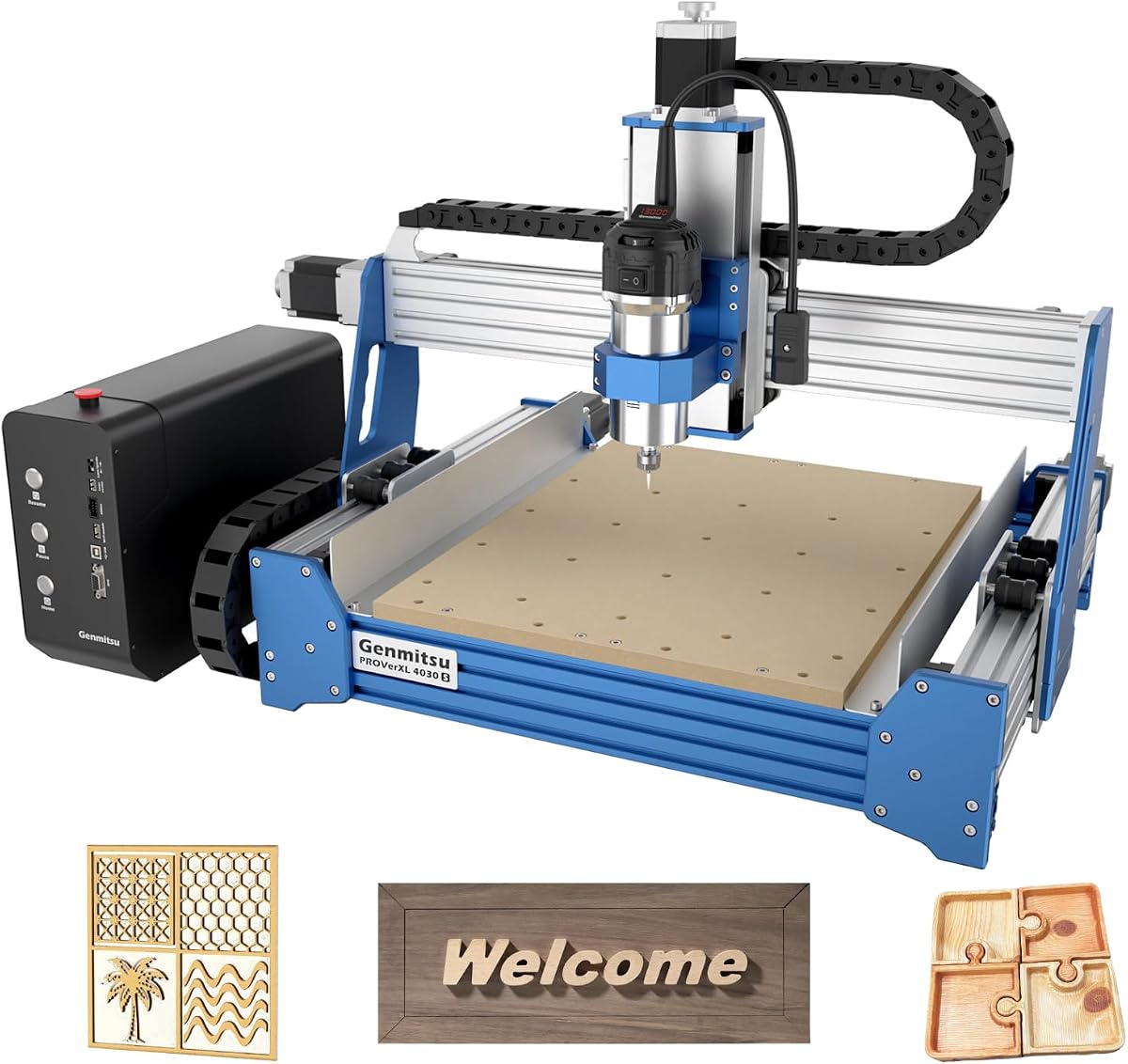
The Genmitsu PROVerXL 4030S is the strongest all-around choice in this guide, combining a 4.4 rating with a rare mix of 710W spindle power, 130mm pass height, a 32-bit controller, and a 400 by 300 millimeter working area. It is particularly well balanced for signs, relief carving, panels, and small furniture components.
We may earn a commission when you buy through this link, at no additional cost to you.
The upgraded Z-axis linear guideway and heavy-duty structure improve stability at high speed, with a stated repeatable positioning accuracy of plus or minus 0.05mm. Its control board and drive chip integration raise maximum operating speed to 5,000 millimeters per minute while keeping reported noise below 65dB. The 32-bit processor handles complex paths more smoothly than the 8-bit controllers used by earlier versions.
The 710W compact router provides enough authority for harder woods, acrylic, and aluminum, while the 130mm pass height expands the range of taller workpieces. A modular preassembled design is claimed to reduce setup time by approximately 20 minutes. Compatibility with the Genmitsu app and earlier PROVerXL 4030 accessories also adds convenience, although the Wi-Fi module must be purchased separately.
Choose the 4030S when you want meaningful spindle power and vertical clearance without moving to a full large-format machine. It serves beginners who need capable hardware, experienced hobbyists seeking an upgrade, and small workshops that need a dependable all-purpose platform. Its balanced specifications explain why it stands out as the editor's choice.
A 130mm pass height materially expands the range of usable stock and three-dimensional forms. It is particularly useful for relief work, taller ornaments, and rotary-related projects that would strain a 60mm or 80mm Z travel.
The 32-bit controller and redesigned drive electronics improve processing of complicated toolpaths. Users can move more quickly while retaining the repeatability needed for clean signs and multi-part batches.
We may earn a commission when you buy through this link, at no additional cost to you.
The FoxAlien Masuter 3S is a high-speed compact CNC router with a 4.3 rating and a strong emphasis on closed-loop motion. NEMA 23-76 motors provide 2.2 Nm of torque and moving speeds up to 10,000 millimeters per minute, while step-loss elimination supports consistent operation during demanding toolpaths.
We may earn a commission when you buy through this link, at no additional cost to you.
Its reinforced 2360mm extrusions and dual HG-15 linear rails on Z improve stability, while a T12 lead screw is intended to reduce vibration and wobble. The stated engraving precision reaches 0.05mm. A 400W spindle handles wood, plastics, and soft metals, and the included 65mm clamp allows upgrades to a handheld trimmer router or a 1.5kW spindle.
Built-in support for the FoxAlien 4th Axis Rotary Module expands the machine beyond flat work. It can carve cylindrical items such as mugs and chess pieces, while the dust-resistant controller housing and tactile shortcut buttons support cleaner, more convenient operation. An optional offline controller enables PC-free carving.
The Masuter 3S is compelling for makers who prioritize rapid movement, precise depth work, and future rotary capability. Its 15.75-inch square area offers generous horizontal room, although the 3.74-inch Z height remains modest. An available X-axis extension kit can widen the workspace for larger projects.
Closed-loop motors help detect lost steps that could otherwise compromise a long cut. The 2.2 Nm torque rating and 10,000mm/min maximum speed make this an appealing choice for productive hobby workflows.
Native rotary-module support allows the router to handle bottles, tumblers, and other round forms. A dust-resistant controller and optional offline operation further improve its suitability for organized workshop use.
We may earn a commission when you buy through this link, at no additional cost to you.
The SainSmart Genmitsu 4040-PRO MAX is a square-format router aimed at makers who want more space than a 300mm machine without moving to a very large frame. Its 3.9 rating is the lowest in this list, but the fundamental design remains attractive for stable panel work and sturdy clamping.
We may earn a commission when you buy through this link, at no additional cost to you.
Advanced X-axis and Z-axis linear guideways are intended to improve motion stability and precision. The 710W digital-display compact router offers useful cutting force, while reduced vibration supports more consistent behavior during faster, higher-load operations. Its 100mm pass height exceeds the earlier PRO version by more than 40%, according to the supplied product information.
The reinforced spoilboard is one of the most useful woodworking features. A central aluminum support bar reduces MDF sagging and doubles as a T-slot, creating a more rigid bed while giving users additional ways to position clamps and fixtures. That combination directly supports repeatable work on panels and boards.
Choose the 4040-PRO MAX for square workpieces, signage, and general hobby production where workholding matters as much as spindle power. Its lower rating warrants checking the latest customer feedback and bundle details, but the mechanical upgrades and reinforced spoilboard make it a solid fit for stabilizing medium-sized jobs.
The aluminum support bar reduces sagging under load, which can improve tool engagement over the full bed. Its integrated T-track also makes fixture placement more repeatable than relying only on edge clamps.
The 710W router and 100mm pass height support demanding jobs without pushing into the largest machine category. The result is a useful middle ground for hobbyists working on thicker or taller panels.
We may earn a commission when you buy through this link, at no additional cost to you.
The CNC Router 4030-Evo Ultra 2 combines a 4.4 rating with an unusually connected control system and high-end motion hardware. Its all-metal frame uses dual HGH-15 linear rails and 1204 ball screws on every axis, including dual-bearing supports intended to reduce vibration and maintain consistency under load.
We may earn a commission when you buy through this link, at no additional cost to you.
The 800W trim router operates from 8,000 to 24,000 RPM with six speed settings. Its stated repeatability accuracy is plus or minus 0.005mm, while actual cutting and engraving accuracy on 6061 aluminum is listed at plus or minus 0.02mm. NEMA 23 motors provide 2.8A operation and 1.2 Nm torque, with closed-loop interfaces available for straightforward upgrades.
GRBL 1.3a on an ESP32 control board expands the usual CNC feature set. It supports laser engraving, rotary operation, coolant commands, closed-loop motors, and a three-pin touch probe. A built-in 32-bit MCU and ESP3D web interface allow control from a PC, smartphone, or tablet without a USB cable, while programmable macro buttons can handle homing, pause, stop, reset, or G-code execution from an SD card.
This is a strong choice for builders who value connectivity, fine control, and future motor upgrades. Its main inconvenience is that spindle speed adjustment still uses a manual dial even though run and stop are software controlled. For connected hobby woodworking and mixed sign, wood, and PCB projects, it offers a capable and flexible platform.
The ESP3D web interface makes it convenient to send jobs or monitor the machine from a phone or tablet. Programmable macro buttons can streamline common actions, reducing repeated interaction with a desktop interface.
Support for rotary axes, coolant, probing, laser functions, and closed-loop motors gives the system a broad upgrade path. Buyers can start with the included hardware and add capabilities as their projects become more ambitious.
We may earn a commission when you buy through this link, at no additional cost to you.
The right CNC router depends on the size, depth, and quantity of your projects, but frame rigidity, drive quality, spindle performance, safety controls, and workflow compatibility are equally important.
The XY working area determines the largest flat workpiece the machine can surround, while Z-axis travel controls how thick or tall a project can be. A 300 by 200mm bed suits small signs, templates, and prototypes, whereas a 400 by 400mm or 600 by 600mm bed offers much more room for panels and grouped parts. Vertical clearance deserves equal attention: shallow systems are convenient for thin stock but may not accommodate upright pieces, deeper relief, or rotary projects without modification.
Choose a workspace that fits your typical largest project, not merely the largest project you can imagine. Also leave room for clamps and sacrificial spoilboard material around the workpiece.
A CNC router generates sideways and vertical forces that can cause tool chatter, lost steps, or poor surface finishes. All-metal frames, reinforced aluminum extrusions, rigid gantry designs, and short spans between supports help keep the tool moving accurately. The frame should be heavy enough to resist vibration without becoming unnecessarily difficult to move, and it should sit on a flat, stable surface.
Prioritize rigid construction and good workholding over cosmetic design. If the machine vibrates visibly during full-speed cuts, extra power will not compensate for an inadequately supported frame.
The spindle supplies the cutting force at the bit. The included 400W, 500W, 710W, 775W, or 800W options in this guide offer different levels of authority, with higher wattage generally helping when carving hardwood, routing thicker boards, or working in tougher materials. Variable speed is important because different bits, woods, and materials require different rotational speeds and feed rates.
Match spindle capability to the materials in your workflow, not to a marketing claim alone. Check whether the package includes the spindle, collet, clamps, and any required power supply before planning additional purchases.
Ball screws and linear rails offer smoother, more accurate movement than many basic belt-drive systems, while closed-loop stepper motors can detect and correct step loss. A 32-bit controller generally handles complex toolpaths more smoothly than an older 8-bit board. GRBL remains a common and capable firmware foundation, while ESP32-based systems can add browser control, macros, probe support, and wireless access.
Consider closed-loop motors, physical hard limits, and diagnostic indicators if you plan long or unattended batches. For casual projects, a proven open firmware and broad software support may matter more.
A router that accepts common collet sizes gives you more freedom to use existing tools. Clamp diameter, collet format, spindle length, and controller compatibility all matter. Support for 52mm, 65mm, or larger routers can reduce friction when expanding later. Rotary-axis support is another important fixture consideration because it opens the machine to cylindrical carvings and repeatable production of round parts.
Check every connection point before buying an aftermarket spindle or rotary attachment. An advertised mount is useful only when the power, control, and mechanical interfaces are compatible.
The machine should work comfortably with the software used to create your files. Popular GRBL-compatible options include UGS, Fusion 360, Easel, Candle, ArtCAM, VCarve, and Carveco Maker. Cross-platform support is useful when a workshop includes both Windows and macOS systems. Offline controllers and SD-card workflows can add resilience, while ESP32 web interfaces make it convenient to control a machine from a phone or tablet.
Check the supplied driver instructions and operating system support before installation. A machine that is powerful but awkward to configure can create unnecessary barriers for beginners.
Useful safety features include limit switches, physical hard stops, an emergency-stop button, dust-resistant electronics, and easily reached home controls. Assembly complexity also affects the experience: preassembled and prewired systems are ideal for first-time users, while modular designs can simplify future repairs or expansions. Organized cable routing, accessible connectors, diagnostic lights, and available replacement parts make long-term maintenance easier.
Never rely on software alone to prevent a crash. Verify that the emergency stop and limit switches work before beginning a cut, and keep the machine connected to a suitable power source.
Begin with a stable, level bench and allow enough clearance around the machine for the gantry, cables, dust collection, and emergency-stop access. Assemble the frame, connect the axes, install the spindle and collet, and check that every limit switch, home button, and emergency stop responds correctly. Before cutting material, move each axis slowly by hand or at low speed and confirm that the origin, travel directions, and coordinate system behave as expected.
Design the job around the machine's stated working area, then secure the stock to the spoilboard or bed using reliable clamps or a T-track fixture. Choose a bit appropriate for the material and task, verify the collet and spindle connection, and begin with a shallow test pass at conservative feed and speed settings. Learn the relationship between spindle speed, feed rate, depth of cut, and chip clearance; each material will behave differently.
After use, remove the workpiece and clean chips from the rails, lead screws, clamps, and enclosure while keeping liquids away from electrical components. Use a soft brush or vacuum with suitable collection, inspect the tool for wear or damage, and store the machine under cover in a dry area. Periodically recheck belt tension, fasteners, axis play, cable connections, and limit-switch alignment to preserve accuracy and safe operation.
A 400 by 300mm or 400 by 400mm working area is a practical starting point for most signs and decorative panels. The FoxAlien Masuter Pro, Genmitsu PROVerXL 4030S, and Masuter 3S provide useful space without moving into a very large benchtop format. Choose an even larger area if you routinely cut oversized boards or want to place several parts on the bed at once.
Hardwood benefits from additional spindle authority because dense fibers increase cutting resistance. The 710W and 800W routers in this guide provide a stronger margin than many compact kits, while a 400W or 500W spindle can still be suitable for smaller jobs. Use sharp bits, reasonable chip loads, and multiple shallow passes rather than forcing a bit too aggressively.
GRBL is a widely supported motion-control firmware used by many CNC routers and CAM software workflows. ESP32-based controls add capabilities such as browser-based control, Wi-Fi access, macros, and expanded firmware functions. Both can perform excellent carving, but the surrounding software, diagnostics, and connection features may differ more than the basic G-code workflow.
Ball screws usually provide greater thrust and accuracy and resist backlash more effectively than belts. They can also require more maintenance and may be less forgiving of contamination, so keeping the rails and screws clean is important. For hobby woodworking with light loads, a well-adjusted belt system can still produce good results.
Many machines in this guide are designed for wood, MDF, acrylic, plastics, and soft metals, but the spindle, bit, feed rate, and technique must match the material. Harder metals demand appropriate tooling, secure workholding, controlled feeds, and realistic expectations. Verify that the current spindle configuration is suitable for each material you plan to process.
Popular GRBL-compatible choices include UGS, Fusion 360, Easel, Candle, ArtCAM, VCarve, and Carveco Maker. The best option depends on whether you want simple 2D carving, parametric CAD work, or advanced three-dimensional toolpaths. Confirm the machine's firmware and the specific features required by your chosen program before creating a complex project.
Leave enough room to operate the gantry, access the emergency stop, manage cables, and collect chips or dust without obstructing airflow. The machine itself should sit on a rigid, level surface that can support its full weight. A dedicated dust-collection arrangement is particularly important when routing MDF, composites, or fine wooden stock.
Closed-loop systems can detect missed steps and stop or correct motion before a larger positional error develops. They can improve reliability during demanding cuts, but accuracy still depends on frame rigidity, axis assembly, calibration, spindle runout, and tool quality. They are best viewed as an added stability and diagnostic feature rather than a substitute for correct setup.
The FoxAlien Masuter Pro is the strongest budget starting point, combining an all-metal frame, quick assembly, and flexible spindle clamps. The Genmitsu PROVerXL 4030S stands out as the most balanced overall machine because of its 710W spindle, 130mm pass height, 32-bit controller, and 4.4 rating. For large-format work, the FoxAlien XE-Ultra 8080 offers exceptional capacity and industrial-grade motion hardware.
Prioritize the constraint that matters most to your actual projects: work area for larger panels, Z clearance for deep relief, spindle force for difficult woods, or rotary support for round objects. A smaller machine with secure workholding and clean calibration can outperform a larger machine that is poorly assembled or used beyond its limits.
Before ordering, verify the current spindle inclusion, collet size, software compatibility, expansion ports, and available accessories. Manufacturer configurations can evolve, so checking the latest listing details ensures the machine you select matches your workshop, materials, and intended projects.