
VTech Genio Bilingual JuniorBook
4.5Editor score
Fully bilingual activities
No internet required
Full-size QWERTY keyboard
Choosing a laptop for an autistic child is less about finding the most technically advanced computer and more about creating a comfortable, predictable learning environment. A useful model should offer age-appropriate content, manageable sensory demands, supportive controls, and activities that encourage independence without overwhelming the child.
We compared ten products using the supplied specifications, focusing on the learning modes, screen size, portability, offline capabilities, parental controls, camera functions, and hardware intended for children or students. The list includes dedicated educational laptops, Android mini laptops, and Chromebooks for online learning, schoolwork, and entertainment.
Each review explains who the device appears best suited for and where its trade-offs may matter. The top three receive award labels, while the remaining picks are evaluated in rank order. Product details and availability can change, and prices fluctuate, so readers should confirm current specifications, parental-control options, and cost before purchasing.
4.5Editor score

4.2Editor score

4.4Editor score
As an Amazon Associate we earn from qualifying purchases.
The table below compares all ten products by type, display, core capabilities, and the features most likely to matter to autistic children and their caregivers.




The VTech Genio Bilingual JuniorBook is a dedicated learning laptop with a listed rating of 4.5. It is designed for children ages five and older and uses a grown-up-looking enclosure, full-size QWERTY keyboard, and cursor controller. Its strongest qualities are the breadth of preloaded content and the elimination of online variables, which can make the experience more predictable for children who benefit from a controlled environment.
We may earn a commission when you buy through this link, at no additional cost to you.
More than 80 activities cover subjects including math, science, language arts, and music, along with Spanish. Apps include a weekly calendar, notebook, music player, and games. Every activity can be used in English or Spanish, allowing a child to follow familiar content in whichever language feels more comfortable. Because all activities are preloaded and no internet connection is required, the laptop does not depend on live content, advertisements, or unpredictable web interactions.
The trade-offs are important. This is an educational toy-style computer rather than a general-purpose laptop, and it is intended for ages five and up. It requires four AA batteries, with batteries included only for demonstration, so regular use requires fresh cells. Older children may eventually need a more capable computer for school assignments, communication, or creative software. Even so, the offline design, bilingual options, and constrained activity set are meaningful advantages when a child benefits from consistency.
This is a strong choice for a younger child who is beginning to explore computers, enjoys structured learning games, or needs a predictable offline activity option. It may also help children practice English or Spanish in a low-pressure environment. For school-aged children needing online classes or a full desktop, consider one of the Chromebooks further down the list, but for controlled early learning, the JuniorBook is one of the most practical choices here.
The absence of internet requirements removes many sources of unpredictable content and external interruptions. Caregivers can let a child explore the included activities without connecting the device to a network.
English and Spanish can be switched throughout the activity set. This gives families a useful way to accommodate language preferences while keeping all content contained on one device.
We may earn a commission when you buy through this link, at no additional cost to you.
The LEXiBOOK LAPTAB 10 inch Version 11 is a touchscreen laptop designed to combine learning, entertainment, and family controls. It has a listed rating of 4.2 and offers a 10.1-inch HD display, an octa-core processor, 128GB of storage, and a 4000mAh battery. Its most relevant feature for this guide is the combination of customizable profiles, robust parental controls, and a child-oriented browser.
We may earn a commission when you buy through this link, at no additional cost to you.
Learning resources include the Power Academy app, 300 eBooks through ReadEra, and a 15-language translator. At the same time, access to Google Play expands the available games, applications, and creative tools. A 2MP front camera supports video calls, while Bluetooth 5.0, Wi-Fi, two USB-A ports, and one USB-C port provide useful everyday connectivity. This makes the LAPTAB more versatile than a device limited to fixed educational programs.
The compromise is that a full app environment requires a greater degree of setup and supervision than an offline learning toy. A child can encounter more variable content, and the stated parental controls must be configured correctly to create useful boundaries. The 10.1-inch screen may also feel smaller for extended schoolwork than the larger displays in this roundup. Nevertheless, the combination of profiles, app filtering, time management, and Qwant Junior browser makes it comparatively well suited to families seeking structured digital independence.
This is our Editor's Choice because it bridges the gap between a dedicated children's learning computer and a full laptop. It is a compelling option for a child ready for apps, e-books, video communication, and web access but who still benefits from firm parental boundaries. Caregivers should establish the profile and controls before regular use, then introduce apps gradually in the same predictable way they would organize any new activity set.
Customizable profiles give each family member a more relevant starting point. For a child, that can mean fewer irrelevant choices and a more consistent interface when returning to the same learning tools.
The included learning library is supported by Google Play availability, allowing the device to progress from structured activities to communication, creativity, and school-oriented applications as the child's needs change.
We may earn a commission when you buy through this link, at no additional cost to you.
The Lenovo 14-inch Chromebook is the most full-featured school-oriented selection in this guide, with a listed rating of 4.4. Its 1920 x 1080 IPS touchscreen, octa-core MediaTek Kompanio 520 processor, 4GB of RAM, and combined 64GB eMMC plus 64GB memory card provide a capable platform for web-based learning, Google Classroom, remote lessons, and everyday communication.
We may earn a commission when you buy through this link, at no additional cost to you.
Its large display offers more room for text, worksheets, video calls, and visual learning than the compact learning laptops. A 720p HD webcam with a privacy shutter, dual-array microphone, Wi-Fi 6, and Bluetooth 5.1 support the realities of contemporary schooling. Chrome OS adds built-in protection and cloud backups, while the included Marxsol accessory package supplies a six-in-one USB-C hub, HDMI and USB cables, mouse pad, wireless mouse, and storage card.
The device is not unlimited. Chrome OS does not support every Windows program, and 4GB of memory may feel constrained when many browser tabs and applications are open. The screen is also large enough that some children may prefer a smaller device, especially during short learning sessions. Nonetheless, this Chromebook offers a strong balance of capability, portability, and bundled equipment, making it the most complete premium-style option in the roundup.
This Chromebook is best for an autistic child who needs conventional school technology rather than a simplified toy computer. It suits families using Google Classroom, online learning platforms, and communication tools, particularly when a larger display and a complete accessory setup are priorities. Caregivers should configure Chrome family controls, individual accounts, and selected extensions before handing it over, then use a consistent routine to make the larger device feel familiar.
The 14-inch Full HD touchscreen provides useful space for simultaneous lesson materials, video calls, and written responses. It is a better fit for sustained schoolwork than the smaller toy-style alternatives.
The included hub, cables, mouse, mouse pad, and memory card reduce the number of separate purchases needed for a home setup. That convenience makes the bundle particularly useful for school and work.
We may earn a commission when you buy through this link, at no additional cost to you.
The Kids Educational Laptop with 48 Learning Modes is a compact, toy-style computer for children ages five and older. It carries a listed rating of 4.0 and centers on a 4.3-inch color TFT screen, realistic mouse and keyboard, and a large collection of learning activities. The selection includes alphabet, mathematics, colors, animals, general knowledge, logic, music, clock reading, and calendar exercises.
We may earn a commission when you buy through this link, at no additional cost to you.
Its simple structure can be helpful for children who prefer a limited activity environment. A child can move from lessons to games that test logic, memory, and speed without encountering the wider range of content found on a general-purpose device. The dimensions are listed as 11 by 8 by 1.2 inches, and the slim, laptop-inspired shape is designed for a comfortable handgrip. A protective film covers the screen initially and must be removed by the caregiver.
Compared with more advanced laptops, the limitations are obvious. A 4.3-inch display is small for extended reading or schoolwork, and the product description does not mention modern app flexibility, parental controls, or a camera. The keyboard is used to answer questions and play games, which may also feel less natural to an older child than using a general computer. For a five-year-old or a child beginning to learn computer conventions, however, these constraints may be appropriate rather than disappointing.
This laptop is a practical option for a younger child who likes structured, colorful learning exercises and does not yet need online classes or advanced applications. It is also a good counterpart to a full Chromebook: one can be used for quiet, focused learning activities while the other handles schoolwork. Caregivers should remove the screen film, establish a limited session routine, and connect the activities to familiar learning goals to maximize engagement.
Forty-eight modes offer more than a single repeated activity. The variety supports repeated learning across literacy, numeracy, time, music, logic, and general knowledge without requiring live online content.
The compact proportions and slim body are intended to be easy for a child to hold and carry. A familiar laptop shape also helps the device resemble the computers used by adults and older siblings.
We may earn a commission when you buy through this link, at no additional cost to you.
The Acer Chromebook 315 is a full-size Chromebook built around a 15.6-inch Full HD IPS touchscreen. It has a listed rating of 4.4 and a 2.76-pound weight, combining a large display with a portable body. For an autistic child who works with long documents, visual presentations, or remote instruction, the screen may be one of its most meaningful advantages.
We may earn a commission when you buy through this link, at no additional cost to you.
Chrome OS provides access to Google applications, including Google Classroom, while the advertised 12.5-hour battery life can support a full day of lessons, communication, and entertainment. The device includes an HD webcam, 802.11ac Wi-Fi, Bluetooth 4.0, two USB-C ports, two USB 3.0 ports, and a combined headphone and microphone connection. Its slim construction and silver finish make it resemble a conventional adult notebook.
The internal hardware is modest. An Intel Celeron N4020 dual-core processor and 4GB of LPDDR4 RAM are sufficient for everyday web tasks but not ideal for demanding software or heavy multitasking. Storage is limited to 64GB eMMC, and the device lacks an optical drive. The large display may also be visually demanding or physically less comfortable for a child who prefers a smaller screen. These considerations make careful setup and realistic expectations important.
The Acer Chromebook 315 is best for a school-age child who needs a conventional, roomy laptop and is likely to use Google-based learning tools. It may be especially useful when longer sessions, readable text, and video classes are priorities. Families should pair it with structured routines, manageable applications, and Chromebook parental controls. If the child needs a more compact device or a faster processor, the Lenovo Chromebook offers a more compact alternative.
The 15.6-inch Full HD panel gives worksheets, browser tabs, and video calls considerable room. Caregivers can adjust text and display settings to keep information easier to follow.
The advertised 12.5-hour battery life reduces interruptions during a school day. It is particularly helpful for children whose routines benefit from extended, uninterrupted work periods.
We may earn a commission when you buy through this link, at no additional cost to you.
The LeapFrog 2-in-1 LeapTop Touch is a preschool learning device with the highest listed rating in this roundup at 4.7. It converts from a keyboard-based laptop into a touch tablet by swiveling the screen, giving children two ways to interact with the same compact device. It is intended for ages two through five rather than older students.
We may earn a commission when you buy through this link, at no additional cost to you.
The keyboard contains the letters A through Z and numbers one through ten. Five learning modes cover letters, numbers, games, music, and messages. Role-play activities include pretending to write an email to the character Scout, while parents can customize content so the child practices spelling their own name. That personalization can make early computer practice feel more concrete and rewarding without introducing a full web environment.
As a toy-style learning product, it has clear limits. The screen cannot provide the sustained schoolwork, communication, or application access of a Chromebook. It requires three AA batteries, and the batteries included are intended only for demonstration. Parents considering it should also be comfortable with a relatively fixed learning path and a playful interface rather than a conventional modern operating system.
The LeapTop is a strong match for a preschool-age autistic child who is working on early literacy, number recognition, name spelling, and basic computer routines. Its convertible design also accommodates children who find a rigid keyboard-only device uncomfortable. It is less appropriate for a child ready for online learning, advanced games, or independent academic work. The key benefit is controlled, intimate interaction rather than technical capability.
The swivel screen lets a child switch between a keyboard and a touch-oriented tablet. This flexibility can help caregivers match the activity to the child's preferred way of engaging.
Parent customization allows the child's own name to appear within the learning experience. That direct connection can make letter recognition and typing feel more personal and motivating.
We may earn a commission when you buy through this link, at no additional cost to you.
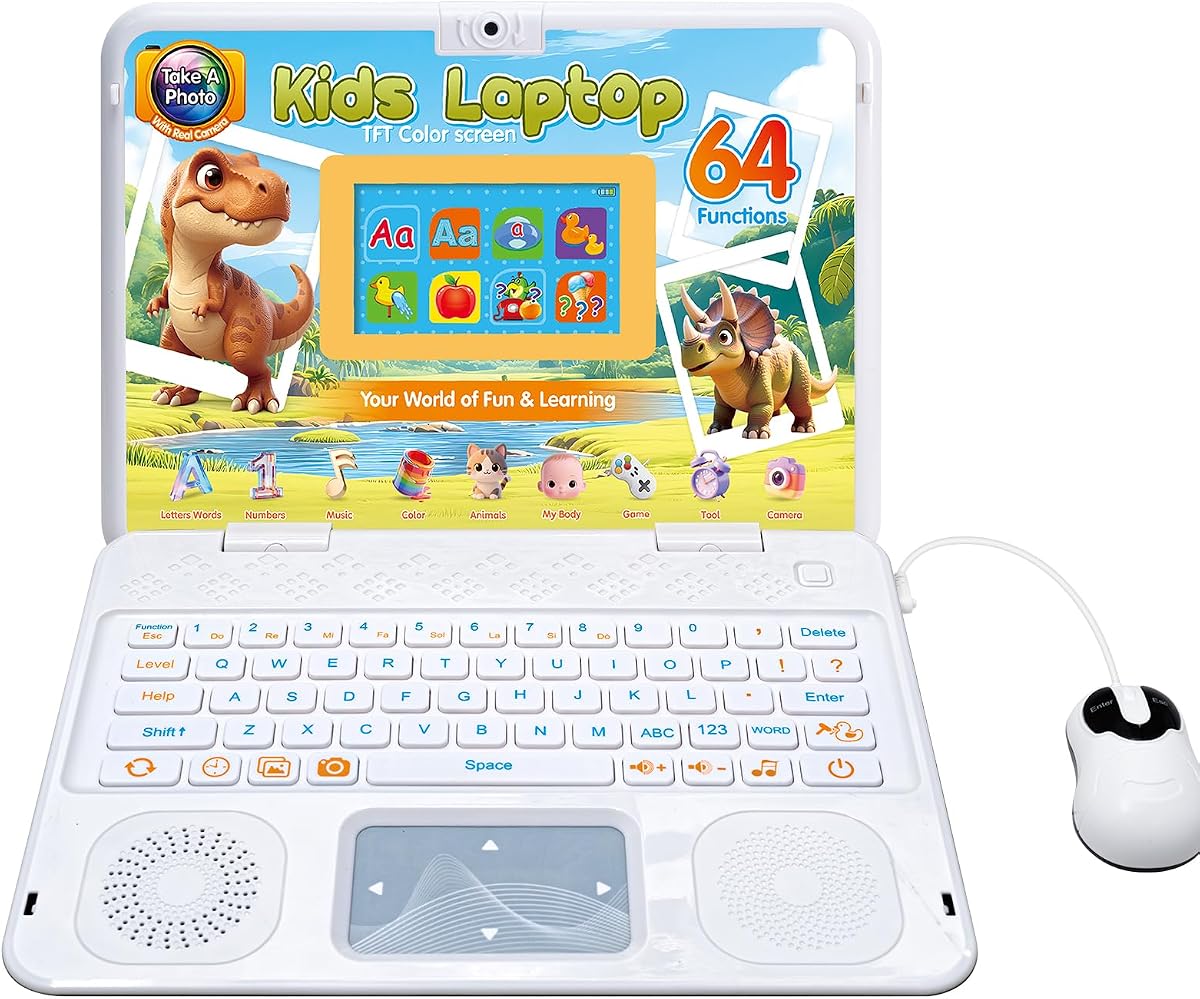
The Kids Laptop with Camera is a compact educational device for children ages five and older, carrying a listed rating of 4.6. It combines a 4.3-inch TFT color display with 64 activities, including alphabet, mathematics, colors, animals, music, games, and camera functions. The built-in camera is the feature that distinguishes it from most of the other toy-style choices here.
We may earn a commission when you buy through this link, at no additional cost to you.
Photo mode includes decorative frames and filters, giving children a way to express creativity and share photos with family or friends. The device also provides games after the learning activities, creating a balance between structured instruction and entertainment. Its slim body, realistic mouse, and keyboard are designed to fit comfortably in a child's hands while maintaining the familiar appearance of a laptop.
The camera also creates a responsibility. Families need to establish clear rules about when photography is appropriate, who may appear in images, and whether photos can be shared. The small 4.3-inch display is not ideal for lengthy school tasks, while 64 activity modes should not be confused with the open app access of a Chromebook or general-purpose laptop. The product description also does not identify specific parental-control features, so adult oversight remains important.
This laptop is well suited to a child who enjoys visual expression and needs a contained set of learning and creative activities. It can provide a gradual bridge between offline educational products and more advanced devices. Caregivers should review the camera functions together, establish consent rules in simple language, and use photo projects as structured activities. For a child who needs full school software, a Chromebook would be the more functional choice.
Frames and filters turn the camera into more than a novelty. A planned photo project can support language, motor practice, family connection, and creative decision-making.
The activity count spans core subjects, music, games, and photography. This variety supports short, varied sessions without introducing the open-ended content found on a conventional laptop.
We may earn a commission when you buy through this link, at no additional cost to you.
The 10.1 Inch Mini Netbook is an Android 12 device aimed at online classes, home schooling, travel, and general work. It has a listed rating of 3.3, the lowest among the products reviewed, so families should weigh its attractive portability and included accessories against more constrained performance. The 1.76-pound body and 10.1-inch IPS display make it notably compact.
We may earn a commission when you buy through this link, at no additional cost to you.
A 1.8GHz quad-core processor is paired with 2GB of RAM and 64GB of storage, which is expandable to 1TB according to the product information. Google Mobile Services support provides access to the Google Play Store, and the 1280 x 800 display is suitable for documents, lessons, and video calls. The package includes the laptop, carrying bag, mouse, mouse pad, and power adapter, reducing setup friction.
The main limitation is performance. With only 2GB of memory, heavy multitasking, many browser tabs, and demanding applications may be sluggish. Storage is also modest, and the product does not describe a Chrome OS security model or a detailed set of child-specific parental controls. It is better suited to basic tasks than to intensive media editing or complex school software. The included accessories are useful, but their presence does not overcome the limited internal specifications.
This mini netbook may suit a child who travels with a caregiver, attends online classes, and primarily uses lightweight web applications. Its carrying bag and compact weight are practical advantages. Before buying, however, caregivers should verify the child's software needs, confirm how Google Play and family-control tools will be configured, and test the included mouse for comfort. For more substantial multitasking, a Chromebook with 4GB of RAM is the stronger choice.
The carrying bag, mouse, mouse pad, and power adapter are included in the box. That arrangement is helpful for children who need a ready-to-go setup for school, travel, or shared family use.
At 1.76 pounds, the device is easy to carry between rooms or trips. Its modest screen preserves portability while still providing enough space for basic online lessons and documents.
We may earn a commission when you buy through this link, at no additional cost to you.
The 10.1-inch Android Learning Laptop is a compact general-purpose device running Android 12.0. It has a listed rating of 3.4 and uses an AllWinner A133plus 64-bit quad-core processor, 2GB of RAM, and 64GB of eMMC storage. The supplied configuration is intended for learning and entertainment rather than demanding professional work.
We may earn a commission when you buy through this link, at no additional cost to you.
The laptop can access Google services such as Docs, Drive, and the Play Store, which makes it more flexible than a fixed educational toy. Its 1280 x 800 IPS display, built-in camera, Wi-Fi, two USB ports, one USB-C charging port, and TF card slot cover the basics of communication, browsing, and document work. The stated battery life is five to seven hours, and the package includes a charger, user manual, mouse, and bag.
As with the other Android mini laptop in this roundup, memory is the major limitation. Two gigabytes can make switching among applications or opening several browser-based tools feel slow, while 64GB of storage provides limited room for downloaded media and files. The product description does not highlight child-specific parental controls, a protected account system, or sensory-focused settings. Caregivers must therefore supply those protections through Android and Google account management.
The device is most appropriate for a child who needs a lightweight Android computer for simple web-based learning, entertainment, and communication. Its small size may also be easier for some children to handle than a full-size notebook. Families should confirm the child's required applications, configure a child-friendly Google account before use, and keep activity expectations modest. A Chromebook offers a better path for heavier school multitasking.
The 10.1-inch display and lightweight form make the laptop easier to carry and position. That can make it less visually and physically overwhelming than a larger classroom-style notebook.
Access to Google Docs, Drive, and the Play Store supports familiar productivity tools. The benefit depends on careful account setup and regular adult review of installed applications.
We may earn a commission when you buy through this link, at no additional cost to you.
The Lexibook Unicorn Educational Laptop is a child-focused computer with a listed rating of 4.3. Its activities cover English and Spanish, mathematics, dactylography, general knowledge, logic, music, and clock reading. The unicorn-themed design and slim laptop shape give it a playful appearance, while the realistic mouse and keyboard make it approachable for children learning basic computer handling.
We may earn a commission when you buy through this link, at no additional cost to you.
The learning material uses different levels, allowing a child to learn, test, and improve knowledge over time. After educational sections, games focus on logic, memory, and speed. Music activities introduce notes, composing, and playing melodies, adding a creative element that can appeal to children who find conventional worksheet-style instruction less engaging. The combination of familiar laptop cues and varied activities supports short, structured practice sessions.
The product is not described as a touchscreen, and its specifications do not highlight internet connectivity, current applications, parental controls, or a camera. It therefore offers less flexibility than the Chromebooks and Android laptops in this guide. Some children may also prefer touch input or need software for remote school. The suitable buyer is therefore a parent seeking a contained educational experience for a younger child rather than a primary communication or school device.
This laptop is best for a child building early literacy, numeracy, language, and time-recognition skills through play. Its subject variety allows a caregiver to rotate activities and reduce the chance that one session becomes repetitive. A consistent routine, clear session ending, and connection between each activity and the child's current learning goals will make the device more useful. For older students, it would be better treated as a supplementary learning tool.
Multiple activity levels let children revisit familiar material and gradually work toward greater challenge. Caregivers can use the progression as a concrete sign of increasing independence.
Note recognition, composition, and melody playing provide an alternative to text-heavy exercises. Music activities can offer another way to engage while reinforcing computer operation and cause-and-effect learning.
We may earn a commission when you buy through this link, at no additional cost to you.
The best choice depends on age, learning goals, communication needs, sensory preferences, and the degree of online access required. Caregivers should evaluate the device as part of a consistent routine rather than relying on technical specifications alone.
Age guidance is one of the most useful starting points because it reflects the complexity of the interface, vocabulary, and tasks. The VTech Genio is intended for ages five and older, the Kids Educational Laptop and camera model are also aimed at ages five-plus, and the LeapFrog LeapTop is designed for children between two and five. Older children are likely to need a more capable Chromebook or Android device for schoolwork, communication, and expanding independence.
A predictable device presents activities in a consistent environment, with minimal surprises and clear boundaries. Offline educational laptops provide the most contained experience because their content does not change through web updates. General-purpose devices offer far more flexibility, but caregivers must establish user profiles, app limits, browser rules, and a consistent set of approved applications before handing them over.
Screen size, brightness, sound, touch response, and overall size can affect comfort. A child may benefit from a smaller 4.3-inch display, while another may need a 14-inch or 15.6-inch screen for readable school materials. Touchscreens can reduce the need for precise mouse movement, while physical keyboards may be preferable for typing practice. Because the product information does not provide detailed sensory ratings, caregivers should also consider covers, headphones, and adjustable system settings.
Counting activities is less important than finding content that matches the child's goals. The VTech includes more than 80 activities, the camera-equipped kids laptop has 64 modes, the educational laptop has 48, and the Lexibook Unicorn covers literacy, mathematics, logic, music, and time. The LAPTAB combines structured educational resources with apps and e-books, while Chromebooks support web-based lessons and teacher-selected platforms.
A connected laptop needs more than a child's lock screen. Look for customizable profiles, app filtering, time limits, and a child-oriented browser. The LAPTAB explicitly provides these features, while Chromebook families should use Google's family controls. Android mini laptops require more deliberate setup because the supplied information does not describe dedicated child controls. Offline learning devices reduce online exposure by keeping activities on the device, but they cannot support live classes or web communication.
Portable devices are easier to use in different rooms and may feel more manageable to a child. The Android netbook weighs 1.76 pounds, the Lenovo Chromebook is listed at 2.86 pounds, and the Acer Chromebook 315 weighs 2.76 pounds. Larger screens improve reading and multitasking but occupy more space. Families should consider how the device will be carried, where it will be used, and whether headphones or a separate keyboard are needed.
Battery life can determine whether a session is interrupted by charging. The Acer Chromebook advertises up to 12.5 hours, while the Android learning laptop states five to seven hours. The Lenovo bundle includes a hub, cables, mouse, mouse pad, and memory card, and both Android mini laptops include carrying accessories. Dedicated toy laptops may require AA batteries, making fresh cells and a charging routine worth considering.
A laptop can support skills such as choosing activities, organizing files, communicating, and completing a routine. Begin with a small, fixed set of activities, introduce changes gradually, and avoid adding apps without a clear educational purpose. Caregivers can create visual schedules, define when the device is available, and gradually reduce assistance as the child becomes familiar with the same process.
Before handing over the device, create the appropriate user profile, install only approved applications, and establish a simple visual or verbal routine for beginning and ending sessions. If the laptop is online, review browser settings, app permissions, camera access, and communication contacts first. For an offline educational device, label the included activities and introduce them in a deliberate order so the child can predict what comes next.
Use short, successful sessions at first and stop while the activity is still going well rather than waiting for frustration or fatigue. Consistent cues can reduce uncertainty, and a caregiver can allow the child to make choices within a limited set of options. Over time, transfer simple steps such as selecting an icon, opening a folder, or starting a video call to the child while keeping instructions brief and consistent.
Protect the device by using a suitable case, keeping food and liquids away from the screen, and cleaning it with a soft dry cloth. Charge educational laptops on a stable surface and follow the stated battery requirements. Parents should also establish rules for camera use, sharing images, and communicating with approved contacts. Review installed applications and account activity regularly, and remove content that no longer matches the child's learning plan.
There is no single best type for every child, but a dedicated educational laptop can be easiest because it has a limited, predictable set of activities and often works offline. A full Chromebook or Android laptop offers more freedom for schoolwork and communication, but it requires thoughtful account setup, parental controls, and supervision. The better choice depends on age, support needs, and the learning goals.
Offline operation can reduce unpredictable content and make short learning activities feel more controlled. The VTech Genio, Kids Educational Laptop, camera-equipped kids laptop, and Lexibook Unicorn provide contained educational experiences. However, a child who needs live classes, teacher communication, current documents, or collaborative work will require a connected Chromebook or Android device with appropriate online protections.
There is no universal advantage. A touchscreen may be easier for a child who struggles with precise mouse movement or finds small keyboard keys challenging, while a physical keyboard can support typing and spelling practice. The best approach is to observe the child's motor preferences and task. Some devices offer both, allowing the child to switch methods for different activities.
Families should look for individual profiles, app installation controls, time limits, browser restrictions, and a child-oriented web experience. The LAPTAB explicitly provides customizable profiles, robust parental controls, time and app management, and the Qwant Junior browser. Chromebooks can use Google's family controls, while Android devices require careful Google account and parental-supervision setup.
The answer depends on the task and the child's comfort. A 4.3-inch display is better suited to short exercises than worksheets or video calls, while 10.1-inch screens offer a more practical middle ground. The 14-inch Lenovo and 15.6-inch Acer Chromebooks are better for simultaneous lesson materials, browser tabs, and communication. A larger screen should still be introduced gradually if it is new or uncomfortable.
No. These devices can support routines, practice, communication, and academic engagement, but they do not replace individualized educational, occupational, speech, behavioral, or medical support. They work best as one tool within a broader plan developed with the child's professionals and caregivers. Goals should be realistic, measurable, and connected to the child's current learning needs.
A camera can support creative projects, family communication, and self-expression, but it also requires clear privacy rules. The Kids Laptop with Camera includes photo frames and filters, making it appealing for creative activities. Parents should teach when photography is appropriate, obtain permission before capturing other people, and decide in advance whether images can be saved or shared.
A Chromebook generally offers a more consistent school-oriented environment, automatic updates, built-in protection, and broad access to Google-based learning tools. An Android mini laptop is lighter and may be less intimidating because of its smaller size, but it can be slower and requires more deliberate family-control configuration. Choose based on the required software, support needs, and family's comfort managing the system.
The VTech Genio Bilingual JuniorBook stands out as a controlled, offline learning option, the LEXiBOOK LAPTAB 10 inch offers the strongest balance of educational content and parental controls, and the Lenovo 14-inch Chromebook provides the most complete school-oriented setup. Together, these top picks illustrate the main paths available: a dedicated learning computer, a managed family laptop, and a full Chromebook.
Prioritize the child's age, preferred input method, tolerance for visual and auditory stimulation, communication needs, and specific learning goals before comparing processors or storage. A simpler device may be more supportive than a powerful one when the software is confusing or the activity set is overwhelming. Whichever option is chosen, consistent routines, limited initial content, and gradual expansion usually produce a more useful setup than unrestricted access from the beginning.
Before buying, confirm the current specification, included accessories, account requirements, parental-control options, and return terms. Prices and availability can change, and family circumstances evolve as children develop new academic and communication needs. Revisit the setup regularly so that the laptop continues to match the child's abilities rather than becoming an outdated source of frustration.