
GIGABYTE B550M K
4.4Editor score
Broad Ryzen 3000-series support
Dual high-speed M.2 slots
Micro-ATX compact layout
Our cheap motherboard guide compares 10 budget-friendly AM4, AM5, LGA 1155, and LGA 1700 boards, covering features, expansion, and compatibility for buyers.
A cheap motherboard can anchor a capable everyday PC, home office, media system, or entry-level gaming build without requiring a full-size premium board. The right choice depends on processor socket, memory type, case size, expansion needs, and available display connections, so a low initial cost is only meaningful when the board fits the rest of the system.
This guide compares ten inexpensive motherboards across AMD AM4, AM5, Intel LGA 1155, and Intel LGA 1700 platforms. The evaluation focuses on the supplied processor support, memory capabilities, storage connectors, expansion slots, networking, display outputs, form factor, power delivery, and practical features that can distinguish one budget board from another.
The selections show that budget value comes in different forms: one board emphasizes broad AM4 processor support, another prioritizes DDR5 and modern networking, and others focus on legacy upgrades, compact sizing, wireless convenience, or gaming-oriented expansion. Product details and availability can change, so check the current listing, CPU support information, and case dimensions before purchasing.
4.4Editor score
4.5Editor score

4.5Editor score
The table below compares all ten boards by platform, form factor, memory support, storage, and key connectivity, making it easier to identify the cheapest compatible option for a new or upgraded system.




The GIGABYTE B550M K is a compelling entry point for a budget PC built around AMD Ryzen 5000, 4000, or 3000 series processors. It carries a 4.4 rating and combines a compact micro-ATX design with useful modern storage support. Rather than concentrating on premium aesthetics or elaborate I/O, it prioritizes the essentials needed to run a Ryzen processor, DDR4 memory, PCIe devices, and multiple storage drives.
We may earn a commission when you buy through this link, at no additional cost to you.
Its most valuable feature is the stated support for three broad Ryzen families on the AM4 socket. That gives buyers access to a large selection of processors while retaining the affordability associated with the platform. The board includes four DIMM slots for DDR4 memory, a PCIe 4.0 x16 graphics slot, one PCIe 4.0 M.2 slot, and another PCIe 3.0 M.2 slot. Gigabit Ethernet and four USB 3.2 Gen 1 ports cover everyday wired connectivity and peripheral attachment.
Power delivery is handled by a digital 3+3 VRM with premium chokes and capacitors, while chipset heatsinks assist with heat dissipation. This is a more restrained specification than the elaborate power systems found on pricier gaming boards, but the limitation must be considered alongside the selected Ryzen processor. The board also emphasizes practical simplicity, with no claim of built-in wireless networking or a front USB-C connection.
This motherboard makes the most sense for a first AM4 build, a compact office system, or an upgrade using a compatible Ryzen processor and existing DDR4 memory. Its combination of processor breadth, four memory slots, and two M.2 options is unusually useful at the budget end of the market. Buyers should still confirm case support, processor compatibility, and the memory modules in the planned system before ordering.
Support for Ryzen 5000, 4000, and 3000 series processors gives this inexpensive board a wide selection of possible CPU upgrades. That flexibility is especially helpful for builders who may want to start with a lower-cost processor and move to another compatible Ryzen chip later.
One PCIe 4.0 M.2 slot and one PCIe 3.0 M.2 slot allow a fast system drive and a second compact SSD without sacrificing the main graphics slot. The board therefore accommodates a faster everyday storage layout while leaving room for additional expansion.
We may earn a commission when you buy through this link, at no additional cost to you.
The LGA 1155 H61 board is the most unconventional choice in this guide, but it gives budget builders access to a mature Intel platform with established Core i3, Core i5, Core i7, Xeon E3 v2, and Pentium processor support. Its 5 rating reflects the supplied customer feedback, though ratings should not be confused with the capabilities of every possible configuration. The board is best understood as a targeted upgrade platform rather than a modern all-purpose foundation.
We may earn a commission when you buy through this link, at no additional cost to you.
Its two DDR3 slots support non-ECC, unbuffered desktop memory up to 16GB in a 2x8GB arrangement, with listed memory speeds of 1280, 1333, 1600, and 1866MHz. A convertible M.2 interface can use either an NVMe drive through a PCIe 2.0 x4 connection or an NGFF SATA-based drive. There is also a full-length PCIe x16 slot, whose usable PCIe 3.0 throughput depends on the installed processor.
For systems without a discrete graphics card, the board offers VGA and HDMI-compatible outputs, but those connections require a processor with integrated graphics. The package includes a SATA cable, I/O baffle, and motherboard, while the user manual and CR2032L battery are not included. These omissions matter for first-time builders, who may need to source a coin-cell battery and installation instructions separately.
Choose this board when you already own a supported LGA 1155 processor and DDR3 memory, particularly if the goal is to reuse older components at low cost. It is not the natural choice for a new DDR5 or DDR4 system because the platform limits future upgrade paths. Confirm integrated graphics support, memory type, processor requirements, and available accessories before buying.
The H61 board makes sense when affordability means reusing a compatible LGA 1155 processor, DDR3 memory, and possibly an older operating-system setup. It turns a legacy collection of components into a functioning budget computer without requiring a current high-end platform.
The convertible M.2 interface supports both NVMe and NGFF arrangements, allowing builders to use a modern compact SSD or a SATA-based module. This makes the board more flexible than its older H61 name might initially suggest.
We may earn a commission when you buy through this link, at no additional cost to you.
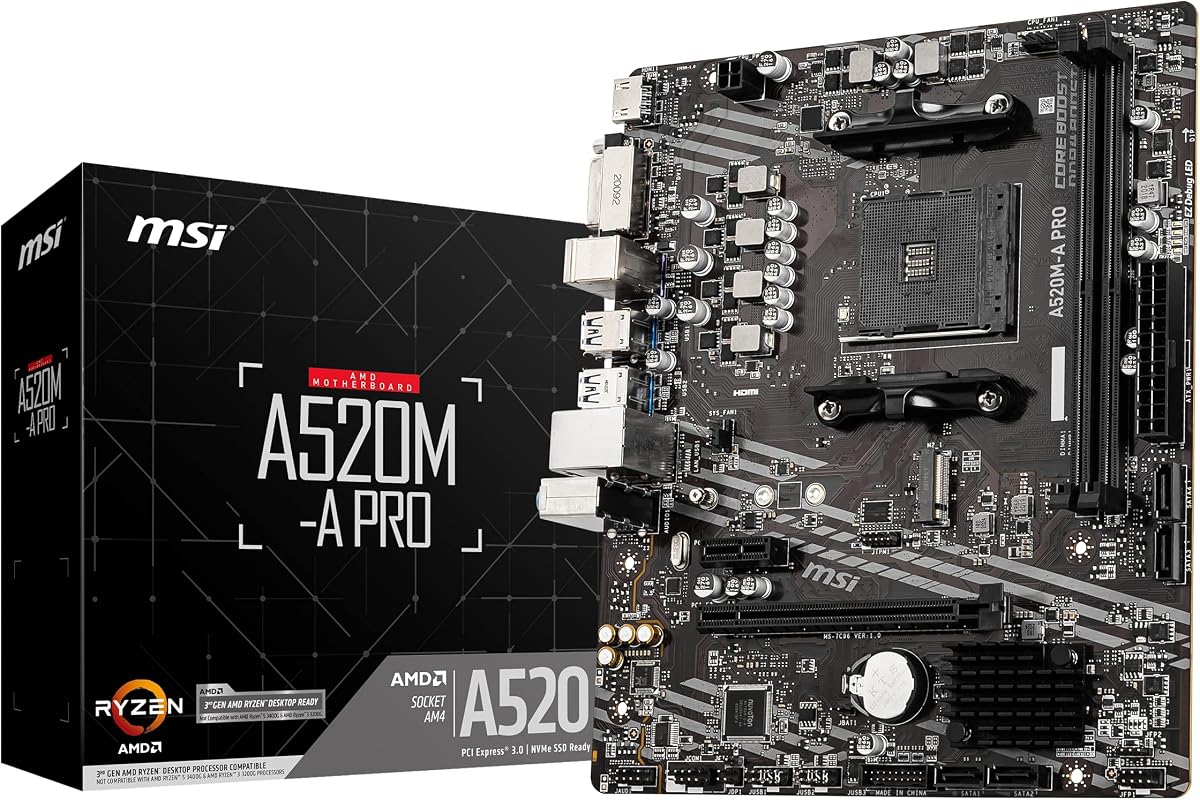
The MSI A520M-A PRO offers a balanced set of features for inexpensive Ryzen-based builds, earning a 4.5 rating. It supports 3rd Gen AMD Ryzen desktop processors and AMD Ryzen 4000 G-Series desktop processors, while the product title also identifies Ryzen 5000 compatibility and AM4 as central platform features. Its micro-ATX size and DDR4 memory support make it a natural candidate for a compact mainstream PC.
We may earn a commission when you buy through this link, at no additional cost to you.
Storage is a notable strength because the Turbo M.2 slot runs at PCIe Gen3 x4 for an NVMe solid-state drive. The board also includes SATA 6Gb/s connectivity, USB 3.2 Gen 1, and DVI and HDMI display outputs. Memory can run at up to 4600MHz in overclocked configurations according to the supplied information, giving builders some headroom for performance-oriented DDR4 kits.
MSI also highlights Audio Boost and the Dragon Center utility, which brings motherboard tools into a single interface. The board does not match the larger ATX models in this list for physical expansion, and PCIe 3.0 is an older interface than PCIe 4.0. However, neither point is especially restrictive for a basic build that uses a single graphics card, a fast SSD, and a few USB peripherals.
This is a strong recommendation for a budget gaming or general-purpose PC when the goal is a straightforward AM4 system with fast NVMe storage and integrated display options. Prospective buyers should check the CPU support list and the exact board revision, particularly if they intend to use a Ryzen 5000-series processor. It is a practical choice that delivers more everyday capability than the simplest entry-level alternatives.
A dedicated PCIe Gen3 x4 M.2 slot provides a useful performance foundation for a modern operating system and active games. In a budget system, allocating the fast slot to the primary drive can produce a noticeably more responsive experience than relying only on SATA storage.
DDR4 memory, PCIe expansion, SATA connectivity, and familiar display outputs provide the core components of a budget gaming platform. The A520M-A PRO focuses on useful essentials rather than premium power phases, elaborate cooling, or full-size expansion.
We may earn a commission when you buy through this link, at no additional cost to you.
The ASRock B550M-HDV combines a 4.5 rating with broad AM4 processor support and a compact micro-ATX layout. It supports Ryzen 5000, 4000, and 3000 series processors, making it a versatile foundation for a new budget build or an upgrade of an existing Ryzen system. Its connectivity choices are particularly useful for office, home, and general-purpose configurations that may use more than one monitor.
We may earn a commission when you buy through this link, at no additional cost to you.
Three display outputs—HDMI, DVI-D, and D-Sub—provide uncommon flexibility among budget boards. For a primary graphics card, the board includes a PCIe 4.0 x16 slot that can use PCIe 4.0 speeds with compatible Ryzen processors. Storage includes a Hyper M.2 connector supporting PCIe Gen4 x4 and SATA3, along with four SATA3 ports for hard drives or additional SATA SSDs.
The two DDR4 DIMM slots support dual-channel configurations and memory speeds listed up to 4733+ in overclocked mode. Power delivery uses a six-phase design with 50A chokes, while Full Spike Protection covers USB, audio, and LAN connections. A small limitation is the lack of wireless hardware, so a Wi-Fi adapter may be needed for cable-free networking.
The board is best recommended for compact builds that need flexible screen outputs and modern PCIe 4.0 expansion. Its two-slot memory arrangement means future capacity is more constrained than on boards with four DIMMs, and the micro-ATX form factor may not fit every enclosure. Verify the chassis dimensions, processor list, and planned memory configuration before ordering.
HDMI, DVI-D, and D-Sub give the board a practical advantage for office and multi-screen configurations. This variety can simplify connections to older monitors while still supporting a modern display through HDMI.
The Hyper M.2 slot handles both NVMe and SATA3 storage, while four SATA3 ports expand the number of traditional drive options. A PCIe 4.0 x16 slot provides a modern graphics path when used with a compatible CPU.
We may earn a commission when you buy through this link, at no additional cost to you.
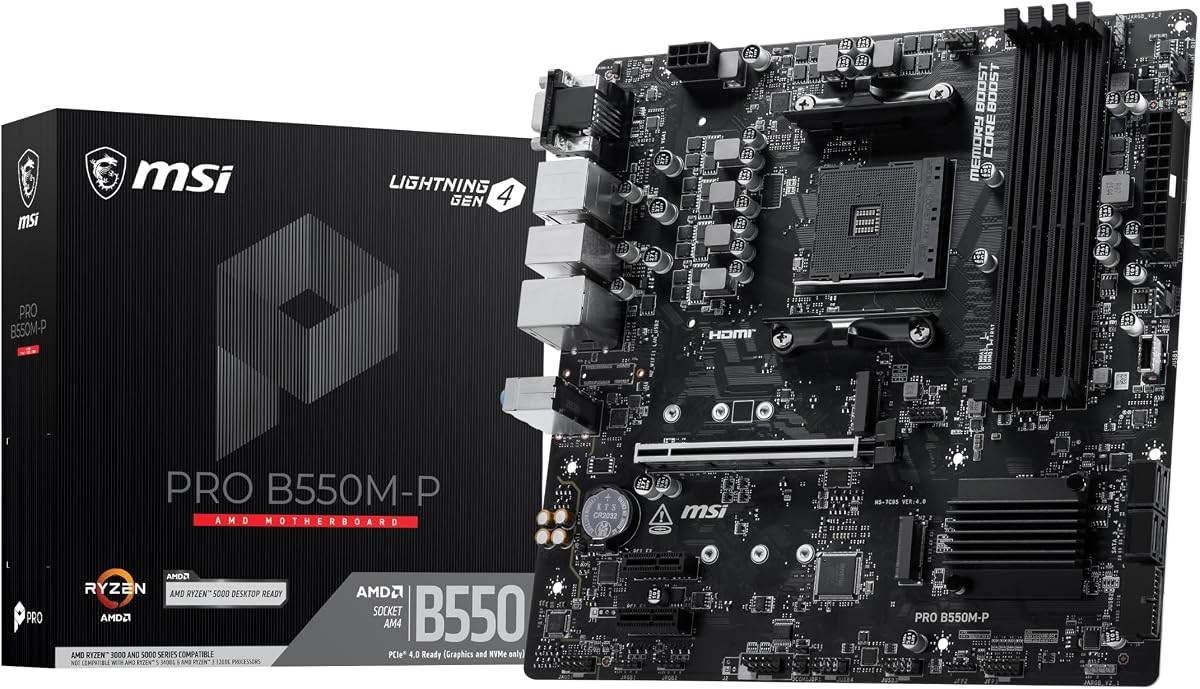
The MSI PRO B550M-P is a compact AM4 board aimed at practical builds that need more memory and storage flexibility than a basic entry-level model. It has a 4.3 rating and supports Ryzen 5000, 5000 G-Series, 4000 G-Series, 3000, and 3000 G-Series desktop processors. Its core appeal lies in four DDR4 slots and two M.2 connectors within a relatively small micro-ATX chassis.
We may earn a commission when you buy through this link, at no additional cost to you.
The primary M.2 connector supports PCIe Gen4 x4 at 64Gbps, while the second supports PCIe Gen3 x4 at 32Gbps. A Steel Armor PCIe 4.0 x16 slot is provided for compatible graphics hardware, and the four memory slots can operate in a one-DIMM-per-channel configuration with listed overclocked speeds up to 4400+ MT/s. Gigabit Ethernet, a rear USB 5Gbps Type-A port, and 7.1 HD Audio cover standard wired use.
Thermal management is handled by passive chipset heatsinks and Frozr AI cooling, which automatically adjusts system fan settings according to CPU and GPU temperatures. The approach is convenient because it reduces the need for extensive manual fan tuning, although it does not make the board equivalent to a premium model with a much larger VRM. The listed power design also requires a sensible processor match.
Choose the PRO B550M-P for a small AM4 gaming or productivity system where four memory slots and two M.2 drives are important. It is a sensible fit for builders who want more flexibility than a two-DIMM board without moving to full ATX. Confirm the installed CPU, memory module arrangement, case clearance, and graphics card dimensions before completing the build.
Four DDR4 slots make it easier to start with a smaller memory configuration and add modules later. This is more adaptable than the two-slot alternatives and can suit builds that need additional capacity for demanding applications.
A Gen4 x4 slot and a Gen3 x4 slot support a fast primary SSD and a second compact drive. Using one drive for the operating system and active applications can make a budget build feel more responsive without requiring a larger storage budget.
We may earn a commission when you buy through this link, at no additional cost to you.
The MSI B550M PRO-VDH WiFi is a feature-rich compact AM4 board with a 4.5 rating. Its standout advantage is the inclusion of Wi-Fi and Bluetooth, reducing the need for a separate wireless adapter in a home or office system. It supports 3rd Gen AMD Ryzen processors and future compatible Ryzen processors that can be enabled through a BIOS update, while the product line is also marketed for Ryzen 5000 systems.
We may earn a commission when you buy through this link, at no additional cost to you.
Memory capacity reaches 128GB across dual-channel DDR4 slots, with speeds listed up to 4400MHz. The board provides PCIe 4.0 expansion and Lightning Gen4 M.2 storage, along with a shielded M.2 area. Core Boost technology combines an optimized power circuit layout with digital power regulation to provide steadier current delivery, while Audio Boost supports the 7.1-channel audio codec.
A major practical benefit is the Flash BIOS button, which allows firmware updating without a processor or memory installed. Display outputs include D-Sub, HDMI, and DisplayPort, providing useful flexibility for integrated-graphics systems. The thermal design uses a heatsink thermal pad rated at 7W/mk and a PCB with two-ounce copper, though the overall platform remains a compact mainstream option rather than a top-end enthusiast board.
This motherboard is well suited to a compact Ryzen PC that needs wireless connectivity and several display options. It can also serve as an upgrade platform for an existing compatible AM4 system, provided the BIOS supports the chosen processor. Check the current CPU list, memory capacity, case support, and network requirements before making the final choice.
Built-in Wi-Fi and Bluetooth remove the need to occupy a PCI slot with an add-in wireless card. That saves expansion space and creates a cleaner installation for a compact office, home, or media system.
The Flash BIOS button allows firmware updates without a processor or memory installed. This makes it easier to prepare the board for a compatible CPU and reduces the inconvenience of arranging a complete system for a simple firmware change.
We may earn a commission when you buy through this link, at no additional cost to you.
The GIGABYTE B550 Gaming X V2 is the premium-oriented pick in this roundup, combining a 4.5 rating with a full-size ATX layout and a broad feature set. It supports Ryzen 5000, 4000, and 3000 series processors on AM4, uses a digital twin 10+3 power phase, and provides a more substantial physical platform than the many micro-ATX options here.
We may earn a commission when you buy through this link, at no additional cost to you.
Its four DDR4 DIMM slots support Extreme Memory Profile configurations, while the primary graphics path uses an Ultra Durable PCIe 4.0 x16 slot. Storage is handled by one PCIe 4.0 M.2 connector and one PCIe 3.0 M.2 connector. The rear panel includes three USB 3.2 Gen 2 Type-A ports and one USB 3.2 Gen 1 Type-A port, while a front USB 3.2 Gen 1 Type-C connection supports newer case accessories.
Thermal Armor, VRM heatsinks, and an integrated I/O Shield make assembly and heat management more convenient. Q-Flash Plus permits BIOS upgrades without installing the CPU, memory, or graphics card, and the refreshed Easy Mode BIOS interface aims to simplify setup. Gigabit Ethernet and Bluetooth 5.3 provide both wired and wireless connectivity, while RGB Fusion adds customizable lighting for builders who want it.
Choose this board when an ATX case, stronger power delivery, abundant rear ports, and a polished gaming feature set matter more than minimizing physical size. It is a particularly useful option for an AM4 gaming system intended to last through multiple compatible processor or memory upgrades. As with every board, verify CPU support, case dimensions, memory clearance, and the number of storage devices you plan to install.
The full-size ATX board provides more physical room for components and expansion than compact alternatives. Its VRM heatsink and chipset cooling are better suited to a visibly complete gaming build where airflow and orderly cable management are priorities.
A front USB-C Type-C header, multiple rear USB ports, Bluetooth 5.3, and Gigabit Ethernet cover common case and device requirements. This makes the board convenient for builders who want current connections without selecting a more costly platform.
We may earn a commission when you buy through this link, at no additional cost to you.
The Gigabyte A520M K V2 is a straightforward micro-ATX AM4 board with a 4.4 rating. Its core selling points are a compact format, two DDR4 memory slots, an M.2 connector, HDMI and D-Sub display outputs, and USB 3.2 connectivity. This makes it relevant to basic home, office, and light entertainment builds where a full-featured gaming board would add cost without being used.
We may earn a commission when you buy through this link, at no additional cost to you.
The listing's supplied information is intentionally brief, emphasizing the AM4 platform, two-DIMM DDR4 configuration, integrated display outputs, M.2 support, and USB 3.2. Its compact MATX format is described as suitable for compact cabinets and medium-sized builds. Compared with the other AM4 choices here, it appears designed around simplicity rather than extensive rear connectivity, wireless features, or a large number of memory slots.
Two memory slots can be perfectly adequate for a modest build, but they offer less flexibility if the system later needs a larger memory capacity. The M.2 connector is valuable because it allows a compact SSD without occupying a SATA connection, while HDMI and D-Sub provide useful choices for different displays. Buyers should consult the full manufacturer specifications and CPU support list for details not included in the supplied product data.
This motherboard is most appropriate for a straightforward AM4 system in which space, simplicity, and core connectivity matter. It may suit an office PC, a compact media center, or an inexpensive family computer with a compatible Ryzen processor and suitable DDR4 memory. Confirm case support, processor compatibility, M.2 details, and included accessories before ordering.
The micro-ATX layout can reduce the space needed for a complete system and make it easier to place the computer on a smaller desk or inside a compact enclosure. It offers a practical footprint without moving to the full-size ATX standard.
M.2 storage, USB 3.2, and both HDMI and D-Sub provide the essentials for a modern operating system, an external drive, and a monitor. The limited specification focus makes this a more basic platform than the more fully specified B550 alternatives.
We may earn a commission when you buy through this link, at no additional cost to you.
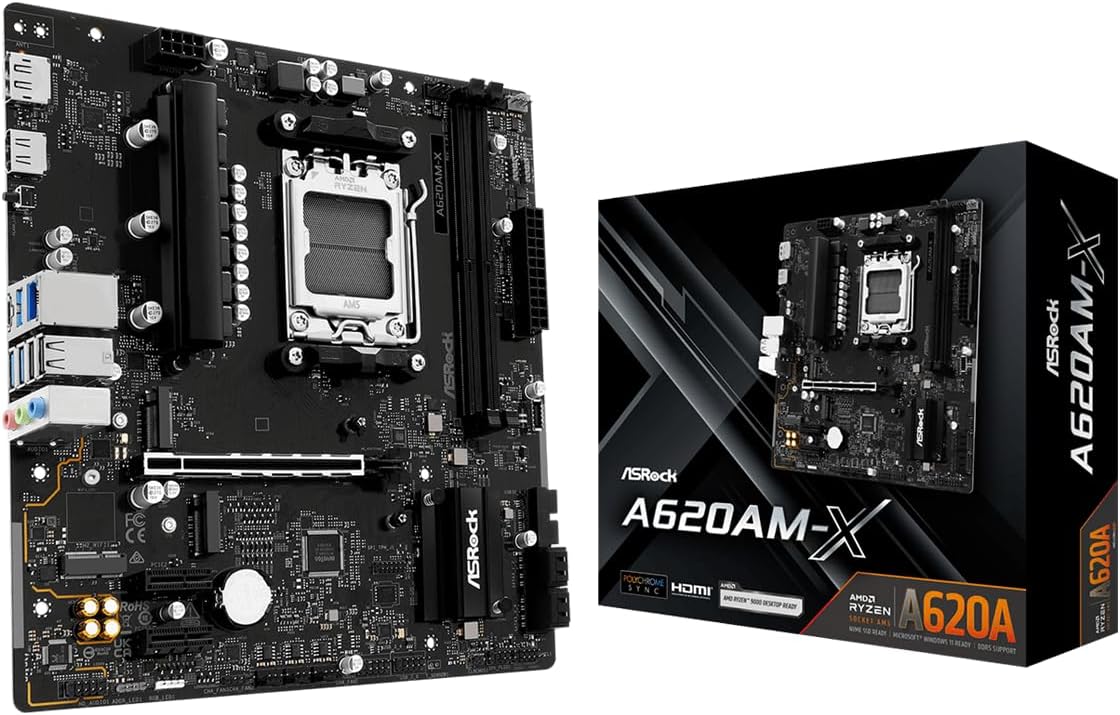
The ASRock A620AM-X is the strongest modern-platform option in this guide, pairing a 4.5 rating with AMD AM5 support. It accommodates Ryzen 9000, 8000, and 7000 series processors, DDR5 memory, PCIe 4.0 expansion, and 2.5G networking. That combination makes it a relevant choice for a new budget build that avoids the older DDR4-oriented platforms.
We may earn a commission when you buy through this link, at no additional cost to you.
Two DDR5 DIMM slots support dual-channel configurations and overclocked speeds listed up to 8000+ with the appropriate hardware and settings. Storage includes two Hyper M.2 connectors operating at PCIe Gen4 x4, plus four SATA3 ports. Front and rear USB 3.2 Gen1 Type-C connections and additional USB 3.2 Gen1 and USB 2.0 ports broaden the device options available to a compact system.
Power delivery uses a 6+1+1 phase design with Dr.MOS technology, and the board includes BIOS Flashback for firmware updates without a processor. HDMI and DisplayPort outputs support integrated graphics from compatible AMD processors. Realtek 2.5G LAN is a meaningful advantage over the 1GbE connections found on several less expensive alternatives, particularly for transfers and busy networks.
Choose the A620AM-X for a new AM5 system that needs current processor support, fast DDR5 memory, dual Gen4 storage, and faster wired networking in a compact package. It offers a more forward-looking foundation than the AM4 boards, although buyers must accept two memory slots and should match the board to an appropriate CPU. Verify case fit, processor support, memory compatibility, and BIOS requirements before purchase.
AM5 support for Ryzen 7000, 8000, and 9000 series processors provides access to several major Ryzen generations. This makes the board more appropriate for a fresh build than an older socket when future processor choices are a priority.
Realtek 2.5G LAN improves wired network throughput compared with standard gigabit Ethernet. Two PCIe Gen4 x4 M.2 slots also allow a fast primary SSD and a second NVMe drive, which is especially useful for compact systems with limited room for traditional hard drives.
We may earn a commission when you buy through this link, at no additional cost to you.
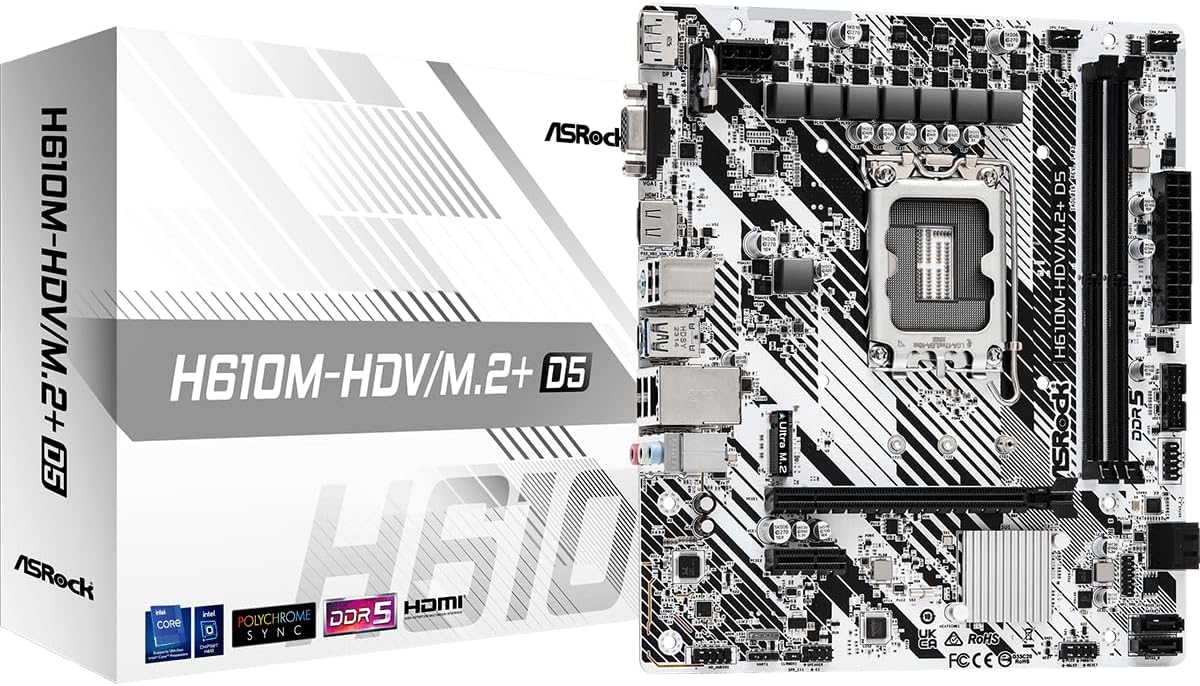
The ASRock H610M-HDV/M.2+ D5 provides an affordable Intel alternative for builders focused on LGA 1700, DDR5, and compact size. It has a 4.4 rating and supports 14th, 13th, and 12th generation Intel Core processors, along with next-generation processors mentioned in the supplied listing. The 6+1+1 power phase provides a clear entry-level foundation for mainstream systems.
We may earn a commission when you buy through this link, at no additional cost to you.
The board supports DDR5 memory at 5600MHz and includes a PCIe 4.0 x16 slot for a modern graphics card, plus a smaller PCIe 3.0 x1 expansion slot. SATA 6Gb/s connectivity and the M.2 Plus designation indicate solid-state drive support, while HDMI, DisplayPort, and D-Sub outputs give users multiple choices for integrated-graphics configurations.
As an H610 board, it is designed around foundational functionality rather than enthusiast features. The supplied data does not mention built-in wireless networking, numerous M.2 connectors, or a large power-delivery system. That keeps the feature emphasis straightforward, but the exact internal layout and included accessories should be confirmed before fitting it to a particular case or component set.
This motherboard is best for a compact Intel office, study, home, or light gaming system using a supported LGA 1700 processor and DDR5 memory. It is also a logical option when you want Intel's socket and DDR5 platform but have no need for advanced overclocking or extensive expansion. Check processor support, case size, M.2 compatibility, display requirements, and memory configuration before ordering.
Support for 12th, 13th, and 14th generation Intel Core processors makes LGA 1700 a familiar platform for compact productivity and home builds. Pairing it with DDR5 creates a modern foundation without moving to a larger or more elaborate motherboard.
A full-length PCIe 4.0 x16 slot supports a modern discrete graphics card, while a smaller PCIe 3.0 x1 slot offers room for an additional card. M.2 Plus and SATA connectivity cover the most common compact-storage and traditional-drive arrangements.
We may earn a commission when you buy through this link, at no additional cost to you.
The right cheap motherboard depends less on the chipset name than on compatibility with the processor, memory, case, storage, and display hardware already in the build. Use the following factors to narrow the field before comparing final specifications.
The socket determines which processors can physically and electrically work with the motherboard. AM4 options in this guide support specified Ryzen 3000, 4000, and 5000 families, while the A620AM-X supports AM5 Ryzen 7000, 8000, and 9000 series. The LGA 1155 H61 serves older Core and Xeon E3 v2-era hardware, and the H610M-HDV/M.2+ D5 targets LGA 1700 processors. A compatible chipset can still impose limits on features such as PCIe generation, M.2 support, networking, and memory overclocking, so both the socket and chipset need to match the planned processor.
Memory compatibility is one of the most important distinctions in this list. The AM4 boards use DDR4, the LGA 1155 H61 uses DDR3, and the modern AM5 and LGA 1700 choices use DDR5. These memory generations are not interchangeable, so a cheap board cannot compensate for the wrong type of RAM. Two-DIMM layouts are common on smaller and entry-level boards, while the GIGABYTE B550M K, MSI PRO B550M-P, and GIGABYTE B550 Gaming X V2 provide four slots. The MSI B550M PRO-VDH WiFi lists support for up to 128GB, whereas the LGA 1155 board is limited to 16GB.
Motherboard form factor must match the enclosure rather than merely determine how small the finished system might become. Eight of the products listed here are micro-ATX, while the GIGABYTE B550 Gaming X V2 is ATX. Some compact cases accept micro-ATX boards, but others require a full-size ATX board, and the supplied ASRock listings explicitly advise checking chassis specifications. GPU length, drive placement, rear-panel clearance, and the position of front-panel headers can also affect assembly even when the board fits.
Expansion requirements should reflect actual accessories rather than a desire for unused connectors. Most boards in the guide provide a PCIe x16 slot for a graphics card, but the H610M-HDV/M.2+ D5 also includes a small PCIe 3.0 x1 slot, while the MSI PRO B550M-P and GIGABYTE B550M K each offer dual M.2 layouts. For storage, count the number of NVMe SSDs and SATA drives needed, then verify the M.2 protocol, lane arrangement, and SATA connector count. A board with one M.2 slot and several SATA connectors may be more appropriate than one with multiple M.2 connectors but no spare SATA ports.
A discrete graphics card can make onboard display outputs unnecessary, but integrated graphics can be valuable for office, media, and troubleshooting systems. The LGA 1155 H61 offers VGA and HDMI-compatible outputs only when the CPU has integrated graphics. The ASRock B550M-HDV includes HDMI, DVI-D, and D-Sub, the MSI B550M PRO-VDH WiFi includes D-Sub, HDMI, and DisplayPort, and the A620AM-X includes HDMI and DisplayPort for compatible AMD processors. Match the port to the monitor and verify that the chosen processor actually supports the required integrated graphics.
Networking can materially affect everyday usability, particularly in a compact or wireless-friendly office. Most options include Gigabit Ethernet, while the ASRock A620AM-X offers Realtek 2.5G LAN and the MSI B550M PRO-VDH WiFi includes Wi-Fi and Bluetooth. The GIGABYTE B550 Gaming X V2 also lists Bluetooth 5.3. USB selection should include both internal and external needs: the Gaming X V2 includes a front USB-C Type-C header, and the A620AM-X lists front and rear USB Type-C connections, while many other boards focus on conventional Type-A ports.
A budget board does not need elaborate cooling, but its power system should be a sensible match for the processor. The GIGABYTE B550 Gaming X V2 has the strongest stated design at a digital twin 10+3 phase, while the MSI B550M PRO-VDH WiFi uses Core Boost power circuitry and a two-ounce copper PCB. The GIGABYTE B550M K uses a 3+3 digital VRM, and the ASRock A620AM-X uses 6+1+1 phases with Dr.MOS. Cooling also matters: chipset heatsinks help, but a capable processor cooler and sensible case airflow remain necessary for sustained performance.
BIOS support can determine whether a processor, memory kit, and expansion device work as intended. The MSI B550M PRO-VDH WiFi and GIGABYTE B550 Gaming X V2 support CPU-free BIOS updating through dedicated flash functionality, while the A620AM-X offers BIOS Flashback. For older platforms, driver and firmware availability can be just as important as raw expansion. Always consult the current manufacturer CPU support list, especially for AM4 boards used with newer Ryzen processors, and confirm whether a firmware update must be completed before installation.
Begin by grounding yourself against an unpainted metal surface and assembling the system on a nonconductive work area. Install the processor and cooler according to the motherboard manual, apply the correct thermal compound if it is not pre-applied, and confirm that the retention mechanism is secure. Memory modules should be seated firmly in the slots specified by the manual, with the retaining clips closed on both ends.
When attaching storage, connect the M.2 module with its retention screw or latch properly positioned and use the correct SATA data and power cables for traditional drives. Install the graphics card only after the power supply cables are disconnected, then secure the card against movement. Connect front-panel switches, USB ports, fans, and display outputs before closing the case, and verify that no loose screws or cables are touching the board.
After the first boot, enter the BIOS to confirm that the processor and memory are recognized at the intended speed. Update the firmware when compatibility requires it, save the settings, and let the system complete several stability tests before transferring important data. Keep the board away from moisture, direct heat sources, and static discharge, and use surge-protected power for a system containing valuable storage or work files.
No. The cheapest board is only valuable when it supports the selected processor, graphics card, memory, and storage without creating expensive compatibility problems. A slightly higher-priced option may be better if it has a stronger power system, more memory slots, faster networking, or a better-matched case layout. Prioritize fit and essential features before cosmetic additions.
Several boards in this guide explicitly list Ryzen 5000-series support, including the GIGABYTE B550M K, ASRock B550M-HDV, MSI PRO B550M-P, and GIGABYTE B550 Gaming X V2. Still, check the exact board revision and current manufacturer CPU support list. Some compatible chips may also require a BIOS update before the processor is recognized.
AM5 provides access to newer Ryzen 7000, 8000, and 9000 series processors, as demonstrated by the ASRock A620AM-X. However, AM4 boards can serve compatible Ryzen processors at a lower overall platform cost and may allow reuse of existing DDR4 memory. The most economical choice depends on whether you already own a processor and RAM or need a completely new platform.
Not necessarily. Two slots can work well for a modest system when paired with a suitably sized memory kit. Four slots are more convenient if you want to start with a smaller configuration, add memory later, or use a broader range of module arrangements. The number of slots does not determine total memory capacity by itself; supported module capacity and the processor's memory controller do.
No. Onboard HDMI, DisplayPort, DVI, or VGA output generally requires a processor with integrated graphics. The LGA 1155 listing explicitly notes this requirement, and the same principle applies to the integrated graphics outputs listed for AMD and Intel boards. If the chosen CPU lacks integrated graphics, install a compatible discrete graphics card.
It is beneficial when paired with a compatible processor and device, but it is not required for every budget use. PCIe 4.0 can provide a faster graphics or NVMe storage path, while the full PCIe 4.0 x16 slot and the M.2 slot are separate capabilities. Check the graphics card, SSD protocol, lane width, and CPU generation rather than assuming every connector receives the full interface speed.
Micro-ATX can help reduce the physical footprint of a build, but it still requires a compatible case with enough clearance for the board, graphics card, and power supply. The GIGABYTE B550 Gaming X V2 is ATX and offers more physical expansion, while the other models are micro-ATX. Always compare the exact board dimensions and component layout with the case rather than relying on the form-factor label alone.
They support many of the same standard devices, but feature priorities differ. Premium boards may offer more USB ports, stronger power delivery, richer audio, advanced networking, front Type-C headers, or CPU-free BIOS updating. The MSI B550M PRO-VDH WiFi, GIGABYTE B550 Gaming X V2, and ASRock A620AM-X show how practical extras can be found at different levels within a budget list.
The GIGABYTE B550M K stands out as a value-focused AM4 option with broad Ryzen processor support, four DDR4 slots, and two M.2 connectors. The ASRock A620AM-X is the forward-looking choice for a new AM5 system, offering DDR5, dual Gen4 M.2 storage, 2.5G networking, and support for three current Ryzen families. For a more complete ATX gaming platform, the GIGABYTE B550 Gaming X V2 adds stronger power delivery, extensive connectivity, front USB-C, and convenient Q-Flash Plus updating.
Before choosing, prioritize the processor socket, required memory generation, case form factor, and number of storage devices. Add wireless networking, fast Ethernet, additional display outputs, or extra memory slots only when they solve a real need. A less elaborate board can be the better budget decision when it matches the system cleanly and leaves enough room for future expansion.
Product specifications, stock, and prices can change, so review the current listing before ordering. Confirm the exact board revision, current CPU support list, BIOS requirements, case dimensions, and included accessories. Checking those details at the final stage helps prevent the most common budget-build problems and ensures that the selected motherboard works with the rest of the planned system.