
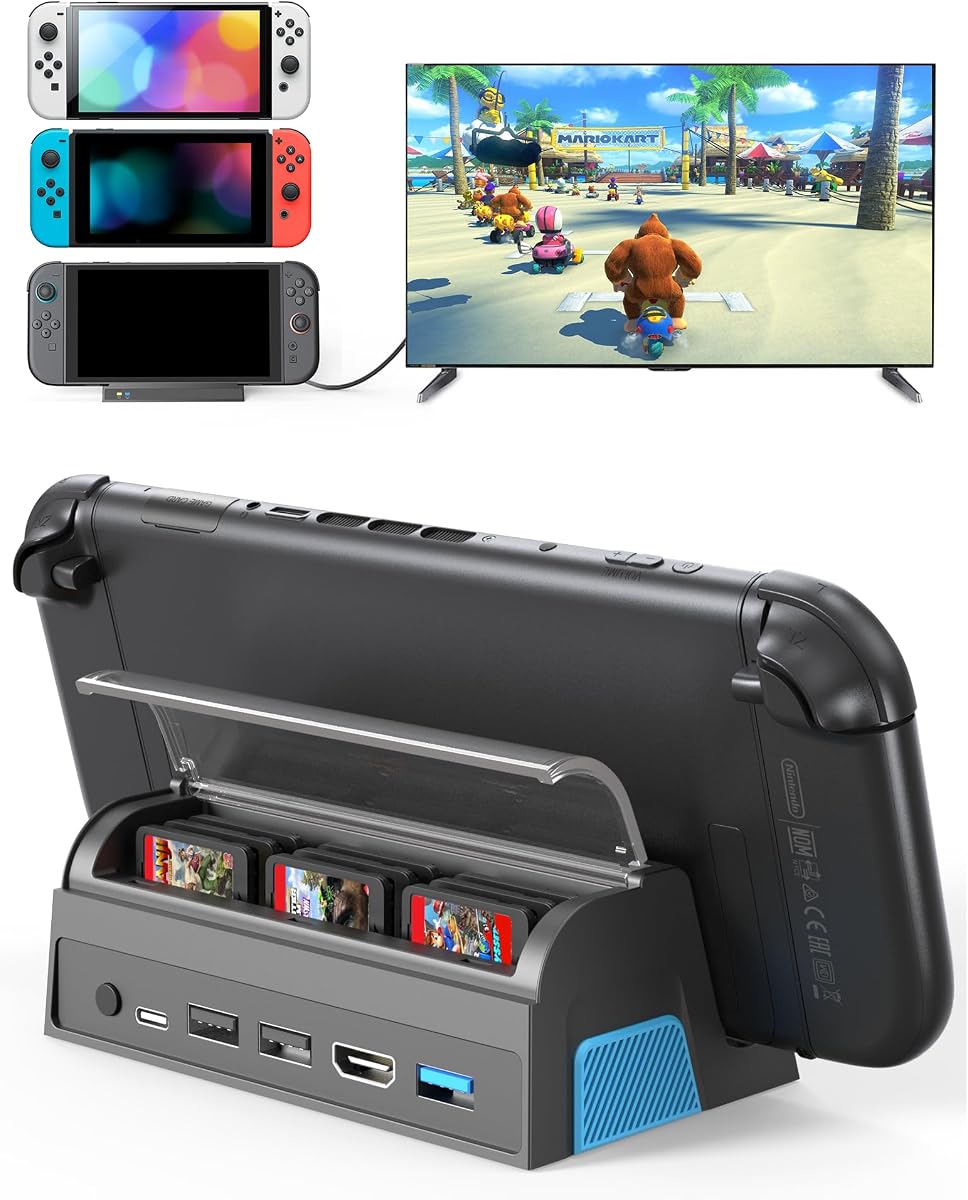
Switch 2 Dock,TV Docking Station with 4K HD Adapter/USB 3.0 Port/USB-C Port,Includes 20V/3A Power Adapter and Cable
4.7Editor score
4K120Hz HDR support
Power adapter included
Four accessory ports
Portable 198g design
Our Switch 2 TV Dock Station guide compares video output, charging, ports, portability, compatibility, and case support across ten docks for home or travel.
A Switch 2 TV Dock Station turns the console into a living-room gaming center, connecting it to a television, monitor, or projector while adding power delivery and accessory ports. A worthwhile model should provide stable video, safe charging, convenient mode switching, and a connector design that works with the way you play.
This guide compares ten docks using the information listed for each product. The evaluation covers console compatibility, maximum display modes, charging behavior, available connections, portability, protective-case support, included accessories, and practical features such as cooling, game-card storage, and RGB lighting.
The list includes dedicated Switch 2 docks, a compact travel adapter, a multi-console model, and the original Nintendo Switch Dock for comparison. Each review explains the strongest reason to choose the product along with any limitations. Availability and prices can change, so verify current listing details before buying.
4.7Editor score

5.0Editor score

4.2Editor score
The table below compares all ten docks by their most important characteristics, including display support, charging, ports, portability, and compatibility. Specifications reflect the supplied product information, and included accessories vary notably between listings.




This Switch 2-specific docking station combines a 5.0 rating with the broadest practical feature set in the roundup. It sends the console's original video signal to a television, monitor, or projector through HDMI, with support for 4K at 60Hz, 1080p and 1440p up to 120Hz, and HDR10. That makes it a strong option for owners who want a flexible desktop-style setup without moving the console itself.
We may earn a commission when you buy through this link, at no additional cost to you.
The most useful feature is its 65W USB-C Power Delivery system, which can charge the Switch 2 while the console is displayed on an external screen. A dedicated button changes between TV Mode and Desktop Charging Mode, while the adjustable connector height gives protective cases more room to remain attached. The USB-A port expands the setup for compatible receivers, wired controllers, keyboards, mice, and USB headsets.
There are a few qualifications. A compatible PD power adapter is required for TV Mode, so buyers who do not already own one should account for that. There is no Ethernet connection, meaning online play depends on the console's WiFi. The USB-C port handles charging only, and the USB-A port is not advertised as a data-transfer port. These limitations reduce convenience compared with a full desktop hub, but they do not undermine the core TV-and-charging proposition.
This is the strongest general recommendation for a Switch 2 TV Dock Station because it balances display flexibility, charging, accessory connectivity, and case compatibility. It suits a player who wants one dock for a living-room television, a desktop monitor, and travel use. The lack of included cables and the charging-only USB-C port are worth noting, but the core functions are clearly described and thoughtfully arranged.
The dock can maintain a larger-screen session while supplying up to 65W through USB-C PD. Its supported display modes cover both 4K60Hz and higher-refresh 1080p or 1440p configurations, giving users room to match the output to their television or monitor.
Rather than forcing every owner to remove a protective case, the adjustable connector height creates clearance for many cases. That makes the dock more practical for everyday use, particularly for players who keep a case installed while traveling or playing at a desk.
We may earn a commission when you buy through this link, at no additional cost to you.
This replacement TV base station carries a 4.2 rating and focuses on a familiar, uncomplicated docking arrangement. It is designed specifically for the Switch 2, using the console's USB-C connection for power and video. The supplied information lists stable 4K at 60Hz or 1080p at 60Hz, covering the core television-output modes most players need.
We may earn a commission when you buy through this link, at no additional cost to you.
Its three-in-one layout includes a Type-C power input, HDMI 2.0 output, and USB 3.0 port. This allows the console to charge while a game is running and provides a connection for an external controller or other compatible accessory. The listing also describes big-screen casting at a stable 1080p, giving users another way to present gameplay on a larger display.
Safety is handled through over-voltage, over-current, and short-circuit protection. The dock also uses an upgraded chip intended to provide stable operation. The principal drawback is the exclusive Switch 2 compatibility: owners of the original Switch, Switch OLED, or Switch Lite cannot use this model. The information also does not identify whether a protective case can remain installed.
Choose this dock if you own only a Switch 2 and want a straightforward replacement base with familiar Type-C, HDMI, and USB connections. It is less versatile for households with several Nintendo console generations, but the focused compatibility and straightforward output make it a practical dedicated option.
The Type-C power input, HDMI 2.0 connection, and USB 3.0 port cover the essential tasks of charging, transmitting video, and connecting an external controller. This reduced layout keeps setup easy for a primary television station.
Over-voltage, over-current, and short-circuit protection provide dedicated safeguards while the console runs from the dock. Those protections are especially relevant during long sessions, when uninterrupted power delivery matters.
We may earn a commission when you buy through this link, at no additional cost to you.
This portable dock earns a 4.7 rating and stands out for its broad console compatibility and travel-friendly proportions. It works with the Switch 2, original Switch, and Switch OLED, but not the Switch Lite. At 5.29 ounces and 6.89 by 2.60 by 1.65 inches, it is positioned as a compact second-screen solution for hotels, vacations, dorm rooms, and alternate television setups.
We may earn a commission when you buy through this link, at no additional cost to you.
Video output is listed at up to 4K at 120Hz, with 2K, 1080p, and 720p options also supported. A single button changes between TV and Desktop modes. The dock can charge while gaming in either mode when connected to the original Switch power adapter and an HDMI cable. Its port selection includes HDMI, USB 3.0, USB 2.0, a USB-C input, and a USB-C output.
The main drawback is that the package contains only the dock and user manual, so a buyer must have suitable cables and a power source. The claimed 4K120Hz capability should also be understood as dock-level support rather than a guarantee that every game or console configuration will render at that rate. RGB ambient lighting adds visual character and can be turned on or off by holding the mode button for two to three seconds.
This is a compelling pick for travelers and owners of more than one supported Nintendo console. It combines multiple ports, charging, broad compatibility, and a very low weight in a single package. For someone who already owns the necessary cables, it offers one of the most adaptable portable docks in the roundup.
At only 5.29 ounces, the dock is easy to place in a backpack or gaming bag without adding much bulk. Its anti-slip base helps keep the console stable wherever a television or monitor is available.
Compatibility with the Switch 2, original Switch, and Switch OLED makes this a useful shared dock for multi-console households. Switch Lite owners should choose a different option because the smaller console is explicitly unsupported.
We may earn a commission when you buy through this link, at no additional cost to you.
This Switch 2 Dock combines a 4.7 rating with one of the roundup's most complete accessory packages. It is smaller and lighter than the official dock, weighing 198 grams and measuring 8.2 by 2.6 by 1.8 inches. That makes it suitable for travel, parties, or a second gaming location while retaining a substantial port layout.
We may earn a commission when you buy through this link, at no additional cost to you.
The dock provides a 4K at 60Hz to 120Hz HDR HDMI output, a USB-C power port, one USB 3.0 port, and two USB 2.0 ports. A back-mounted button changes between TV and handheld operation. The supplied 20V, 3A power adapter and HDMI cable eliminate the need to purchase those core items separately, while the smart charging chip provides short-circuit, overcharge, overheating, and recovery protection.
Its wider footprint and larger construction make it less compact than the smallest travel docks in the list. The product information also does not explicitly promise compatibility with protective cases. As a result, buyers who require a case to remain installed should examine the connector clearance and product dimensions before ordering.
This is the best premium package for someone who wants a capable dock, power adapter, and HDMI cable in one purchase. The broad port selection, high-resolution claims, and included accessories reduce setup friction. It is especially attractive for a second-TV setup, although travelers who prioritize minimum weight may prefer one of the smaller alternatives.
The inclusion of a 20V, 3A power adapter and an HDMI cable makes this one of the most immediately usable options. Owners can connect the dock, attach the supplied power, route the included cable to the television, and begin using the console in TV mode.
One USB 3.0 and two USB 2.0 ports leave room for compatible controllers, receivers, and other accessories. The combination of these ports and a dedicated USB-C power input creates a more useful desktop-style arrangement than a minimal adapter.
We may earn a commission when you buy through this link, at no additional cost to you.
The SIWIQU dock is a dedicated Nintendo Switch 2 solution with a 4.2 rating. It weighs just 109 grams and measures 7.5 by 2.3 by 1.3 inches, making it substantially lighter and slimmer than many fixed docking stations. Its red-and-blue styling also gives the otherwise minimal accessory a recognizable Nintendo-inspired appearance.
We may earn a commission when you buy through this link, at no additional cost to you.
A rear button switches between Tabletop Mode and TV Output Mode. The console seats tightly within the guide notch, which uses a spring-buffer design intended to reduce stress on the port during repeated docking. An anti-skid pad helps prevent accidental movement, and the smart chip includes short-circuit, excessive-power, recovery, and overheating protection while charging.
Compatibility is the main constraint. The dock works only with the Nintendo Switch 2 and does not support the original Switch, Switch OLED, or Switch Lite. It is also explicitly not compatible with protective cases, which may disappoint users who prefer to keep a case installed. Only the dock is included, so the official Switch power adapter and necessary connection cables must be supplied separately.
This model makes the most sense for a Switch 2 owner who values low weight over multi-console support or case compatibility. Its guided connector, compact body, and charging protections provide a clean, travel-friendly package. It is a focused choice for moving between a tabletop setup and a television rather than a universal console hub.
The 109-gram weight and slim dimensions make the dock easy to carry between locations. It suits travelers who want to connect a Switch 2 to a hotel television or a friend's display without carrying a large stationary base.
The spring-buffered notch helps guide the console into position and is designed to reduce repeated port strain. Paired with the anti-skid base, it helps the console remain securely seated during play.
We may earn a commission when you buy through this link, at no additional cost to you.
The pdobq travel dock is the budget-focused choice in this guide, combining a 4.2 rating with a compact adapter format. It supports the Nintendo Switch 2, original Switch, Switch OLED, and Steam Deck, but not the Switch Lite. Its video output is 1080p at 60Hz, which is suitable for many televisions and monitors without claiming the higher resolutions found on more advanced docks.
We may earn a commission when you buy through this link, at no additional cost to you.
Setup uses a compatible 15V 2.6A or 20V 3A PD wall charger for the applicable console and an HDMI cable. The adapter also includes a USB 3.0 port and an HDMI 2.0 output, while the product listing states that it supports play while charging. The connector is described as a small, lightweight travel dock that can connect to HDTVs, monitors, and projectors.
The biggest limitation is resolution. While the listing mentions 4K60Hz in the context of using a compatible Steam Deck and display, the stated Switch TV output is 1080p at 60Hz. Buyers should therefore choose this dock for affordability and portability rather than high-resolution claims. The official Nintendo charger and an HDMI cable are also needed for TV play.
This is the best budget recommendation for a player who wants a simple second screen or travel setup across multiple compatible devices. It delivers the essential functions—external video, accessory connectivity, and charging—without the extras found in more specialized docks. It is particularly sensible for users who do not need 4K output or a large game-card organizer.
The adapter reduces a full TV dock to a small hub with an HDMI output, USB 3.0 connection, and power input. It is a practical way to bring television gaming to a second location without carrying a larger permanent dock.
Support for the Switch 2, original Switch, Switch OLED, and Steam Deck gives the adapter more flexibility than many dedicated docks. This makes it useful for mixed-device homes, travelers, and anyone testing several compatible screens.
We may earn a commission when you buy through this link, at no additional cost to you.
The QJYKIONE dock stands out with a 4.7 rating and a feature rarely found in the other products: nine dedicated game-card slots. It works with the Nintendo Switch 2, original Switch, and Switch OLED, making it suitable for physical-game players who want their console and library organized in one portable unit.
We may earn a commission when you buy through this link, at no additional cost to you.
Video is listed at up to 4K120Hz or 1080p, although the product information clarifies that Switch 2 supports up to 4K60Hz while the original Switch and OLED are limited to 1080p. A Type-C charging port, one USB 3.0 port, two USB 2.0 ports, and a TV/desktop mode button provide the core connections. The nine card slots have a dust cover to help keep games secure and organized.
As with several compact docks, the device does not support protective cases. The package contains only the dock and user manual, so compatible HDMI and charging cables must be available separately. Actual 4K performance also depends on the game, the console settings, the television, and the HDMI 2.1 cable recommended by the manufacturer.
This is the pick for physical collectors who regularly travel with game cards. The combination of high-resolution output, charging, multiple accessory ports, and protected card storage offers functionality that simpler docks do not. It is less suitable for digital-only players or anyone who keeps a bulky case on the console.
The built-in storage turns the dock into more than a video adapter. Owners can keep a substantial selection of physical game cards organized and protected in the same unit used for charging and television output.
The dock supports 4K60Hz for compatible Switch 2 use and 1080p for the original Switch and OLED. That distinction makes it one of the more flexible choices for households maintaining several supported console generations.
We may earn a commission when you buy through this link, at no additional cost to you.
The Nintendo Switch Dock Set is the established original Nintendo accessory and carries a 4.2 rating. Its package includes the dock, an AC adapter, and an HDMI cable, providing the core components needed to connect a compatible Nintendo Switch to a television. It serves as a useful reference point when comparing the portability and expanded connectivity of newer Switch 2 alternatives.
We may earn a commission when you buy through this link, at no additional cost to you.
The original product is designed specifically for the Nintendo Switch system. Its value lies in its established official design and straightforward package, rather than in portability or advanced port selection. It is a separate hardware generation from the Switch 2 docks featured elsewhere in the guide, so buyers should confirm the console they own before considering it.
The supplied product information does not list Nintendo Switch 2 compatibility. It also does not describe high-resolution output, one-button mode switching, case-friendly clearance, or modern USB-C power delivery. As a result, choosing this dock for a Switch 2 would be inappropriate based on the provided compatibility information, even if some physical resemblance might create confusion.
This product is best for an original Nintendo Switch owner who wants the official dock, adapter, and cable as a coordinated set. It is included to provide a direct manufacturer-made reference, not as the recommended choice for a Switch 2. Those purchasing for Switch 2 should choose from one of the explicitly compatible models in the rest of the roundup.
The dock, AC adapter, and HDMI cable are all included, reducing the need to source a separate power solution and display cable. That convenience is the core reason to choose an official accessory package.
The listing names the original Nintendo Switch as its compatible device and does not identify Switch 2 support. This distinction is essential because visually similar docks can use different connectors, power requirements, and output capabilities.
We may earn a commission when you buy through this link, at no additional cost to you.
This Switch 2 replacement dock has a 3.7 rating, the lowest among the products in the guide, but it includes several useful elements. The package is listed as a replacement TV base docking station with an upgraded IC module, charger, and HDMI cable. It is designed to provide a familiar Switch 2 connection experience without requiring users to assemble the entire setup separately.
We may earn a commission when you buy through this link, at no additional cost to you.
Display output is listed at up to 4K60Hz, with 1080p60Hz available for standard play. It uses USB-C connectivity, a dedicated power connection, and HDMI 2.0 for a television or monitor. A USB 3.0 port allows compatible external controllers and accessories to be connected, while charging while playing keeps the console powered during a television session.
Over-voltage, over-current, and short-circuit protection provide basic safeguards for the power system. The product does not list the wider range of USB ports offered by several competing docks, nor does it provide information about protective-case compatibility. Its 3.7 rating suggests that buyers should pay particular attention to current customer feedback and the overall package value.
The dock is most suitable for a Switch 2 owner who values a ready-to-connect package and prioritizes the included charger and HDMI cable. It can also serve as a second dock for a home or travel setup. However, buyers seeking more ports, a lighter frame, or stronger customer feedback may find a better-balanced alternative elsewhere in the list.
Including the charger and HDMI cable removes two common sources of setup friction. The owner can begin with a complete connection rather than first determining which compatible power adapter and cable are needed.
The dock centers on one HDMI output, USB-C power, and a USB 3.0 accessory port. This restrained arrangement closely reflects the basic needs of television gaming and avoids adding complexity that a player may never use.
We may earn a commission when you buy through this link, at no additional cost to you.
The GuliKit dock is a 3.9-rated option designed around broad console compatibility, case-conscious docking, and heat management. It supports the Switch 2, original Switch, and Switch OLED, and its open construction leaves the console's bottom air intakes uncovered. Convection vents near the base and USB-C power area promote airflow during longer gaming sessions.
We may earn a commission when you buy through this link, at no additional cost to you.
Video specifications include 4K at 60Hz, 2K at 120Hz, and 1080p at 240Hz, along with dynamic and static HDR and Auto Low Latency Mode. The dock includes a 100W USB-C PD charging stand, an HDMI port, power input, Type-C output, and USB 3.0 connection. TV and tabletop modes can be switched using the mode control, while four anti-slip pads and a wide body improve stability.
Case support is more specific than the word 'case friendly' might initially suggest. The dock works with protective cases that have bottom-thinning treatment no thicker than 1.0 millimeter or a suitable notch. It also has a magnetic dust cover that attaches automatically. The product information recommends updating to the latest firmware, which is an important setup step for owners.
This dock is a strong option for players who prioritize cooling and want to keep a compatible protective case installed. Its multi-console support and 100W charging system add further appeal. The 3.9 rating should prompt buyers to examine recent customer feedback carefully, but the physical design addresses two common docking concerns: heat and case clearance.
The dock avoids covering the console's lower air intakes and adds vents around its base and power area. This layout is intended to reduce heat buildup during extended play while also preventing the dock itself from pressing against the console's screen.
Compatible cases can remain installed when they are thinned at the bottom to no more than 1.0 millimeter or feature an appropriate notch. This is a meaningful improvement for users who would otherwise need to remove a protective case every time they dock.
We may earn a commission when you buy through this link, at no additional cost to you.
The right Switch 2 TV Dock Station depends on how you play, where you use it, and which accessories you already own. Display capability, charging speed, case clearance, port availability, portability, and included cables should be evaluated together rather than treated as isolated specifications.
A dock's advertised maximum resolution is only one part of the final viewing experience. The Switch 2-related listings in this guide range from 1080p60Hz output to advertised 4K60Hz or 4K120Hz support. The actual result depends on the console mode, game, television, HDMI cable, and display settings. Some games do not support 4K, and the QJYKIONE listing specifically notes the differing limits of Switch 2 and earlier console models.
Choose based on the equipment already in your home. A 4K120Hz-capable dock adds flexibility for compatible monitors and newer televisions, while 1080p60Hz may be entirely adequate for a smaller television or secondary display. Always verify that the TV and selected HDMI cable support the desired mode.
Charging while playing is a core requirement for uninterrupted docked sessions, but power delivery varies across the roundup. The GuliKit offers a 100W PD charging stand, the top-ranked dock supports up to 65W, and the Switch 2 Dock with Adapter includes a 20V, 3A adapter. Other compact models generally expect the user to connect an original or otherwise compatible Switch power adapter.
Check both the dock's maximum supported input and what is included in the box. A dock advertised for charging may still require a separate PD adapter and HDMI cable. Confirm the correct wattage, connector, and protocol before purchase to avoid an incomplete setup.
Compatibility is more nuanced than simply looking for the words 'Switch 2 dock.' Some products work with the Switch 2, original Switch, and Switch OLED, while the SIWIQU and the second-ranked model are dedicated to the Switch 2. The original Nintendo Switch Dock included for comparison is not listed for Switch 2 use. Switch Lite is unsupported by every multi-console model in the roundup.
Case clearance is equally important. The GuliKit accommodates cases with specified bottom thinning or notches, the top-ranked dock uses an adjustable connector, and several other docks explicitly state that protective cases are not compatible. Check your exact case design before buying rather than assuming every slim case will fit.
The useful port count depends on the accessories in your gaming setup. Controllers, wireless receiver dongles, headsets, keyboards, mice, and storage devices may depend on both connector type and data support. The top-ranked dock includes a USB-A accessory port but notes that it does not support data transfer, while several alternatives offer multiple USB 3.0 and USB 2.0 connections.
Count the peripherals you expect to use and check their interface requirements. More ports do not automatically mean better compatibility, so look for the exact USB standard, data-transfer support, and controller or receiver support stated in the listing. Remember that a USB-C power port may be input-only rather than a data connection.
Travel docks can weigh as little as 5.29 ounces, while the more substantial Switch 2 Dock with Adapter weighs 198 grams. The QJYKIONE adds game-card storage, and the SIWIQU and GuliKit models also prioritize light construction. If the dock is staying beside one television, weight may matter less than cable management and stability.
Package contents need equal attention. The Switch 2 Dock with Adapter and the IC Module model include a charger and HDMI cable, while several other listings include only the dock and manual. Owning an original Switch power adapter and a suitable HDMI cable may make a dock-only package more convenient and cost-effective.
Heat management becomes more important during extended television sessions, particularly when the console is charging while running a demanding game. The GuliKit uses an open design and ventilation openings to leave the console's lower air intakes exposed. The top-ranked dock also includes ventilation openings intended to promote airflow and reduce heat buildup.
Consider the physical setup around the dock as well. Leave the console's bottom unobstructed, avoid enclosing the dock in a tight cabinet, and use reliable cables that are not bent sharply at the connectors. Cooling features are helpful, but proper placement remains part of safe operation.
Some buyers need more than a display adapter. The QJYKIONE dock provides nine protected game-card slots, making it attractive for physical collectors and travelers who do not want to carry a separate case. The Portable TV Docking Station adds RGB ambient lighting, which can help distinguish a portable gaming station from a plain adapter.
Treat these extras as secondary to the core functions of video output, safe power, and stable docking. A game-card organizer is useful only to physical-game owners, while RGB lighting is cosmetic. Prioritize the dock that best matches your gaming habits and the equipment already in your setup.
Most products in the roundup describe protection against common electrical faults. The second-ranked model and IC Module dock mention over-voltage, over-current, and short-circuit protection, while the Portable TV Docking Station, SIWIQU, and QJYKIONE docks also describe overcharging, overheating, or excessive-current safeguards. These features provide reassurance for docked play, but they do not replace using a compatible power supply.
Some models also benefit from firmware maintenance. The GuliKit listing explicitly recommends updating to the latest firmware. For any dock that supports updates, check the manufacturer's instructions after setup and before installing a major console update so that compatibility and performance information remain current.
Begin by placing the dock on a stable, level surface near the television or monitor. Connect the dock's power input to a compatible PD charger, connect HDMI to the display, and attach any required USB accessories before seating the console. Allow several seconds for the television to recognize the signal, then use the dock's mode button or the console's display controls as appropriate.
Check the television's input source and resolution settings, especially when using a 4K-capable model. Not every game supports 4K, and the selected output can depend on the console, game, cable, and display. If the screen is blank, reseat the console connector, confirm that the HDMI cable is firmly connected, and verify that the dock is receiving adequate power.
For long sessions, keep the console's bottom vents unobstructed and use the dock's ventilation or open design as intended. Remove protective cases only if the dock requires it, avoid leaving cables under tension, and disconnect the power when the dock is not in use. Periodically inspect connectors for dust or damage, and update compatible dock firmware when the manufacturer provides a newer release.
No. The products in this roundup advertise different output levels, including 1080p60Hz, 4K60Hz, and 4K120Hz. Actual resolution also depends on the game, console mode, television, HDMI cable, and selected settings. Treat the dock's maximum specification as a capability rather than a guarantee for every title.
It depends on the dock. The GuliKit supports cases with bottom thinning of no more than 1.0 millimeter or cases with a suitable notch, while the top-ranked dock uses an adjustable connector to accommodate many cases. The SIWIQU and QJYKIONE explicitly state that protective cases are not compatible, so check the exact requirements before ordering.
No. The Switch 2 Dock with Adapter and the TV Dock Station with IC Module list a power adapter and HDMI cable in the package. Several other docks include only the dock and user manual, meaning you will need a compatible Switch power adapter and HDMI cable. Some portable models are designed to use the original Switch power adapter.
Several models support more than the Switch 2, including the Portable TV Docking Station, pdobq travel dock, QJYKIONE dock, and GuliKit dock. The second-ranked Switch 2 TV Dock Station and SIWIQU dock are dedicated to the Switch 2. The original Nintendo Switch Dock included in the comparison is listed only for the original Nintendo Switch system.
Most of the listed docks support charging while playing in TV or tabletop mode, provided the correct compatible power adapter is connected. Power requirements vary, and some listings recommend the original Switch power adapter. A dock's ability to pass video and charge simultaneously does not mean every USB port is designed for data or accessory power.
A fixed dock is designed to remain near a television and generally provides a more stable, accessible connector. A travel adapter is smaller and lighter, making it easier to carry in a bag. The pdobq model is the clearest travel-adapter example, while larger models emphasize stability, multiple ports, cooling, or game-card storage.
The top-ranked dock has no Ethernet port, so online gaming on that model depends on the console's WiFi. The supplied information does not list Ethernet support for the other products either. If a wired network is important, verify the dock's specifications before purchasing rather than assuming every TV dock includes an RJ45 connection.
First, confirm that the dock has power and that the HDMI cable is connected to the correct television input. Reseat the Switch 2 connector, allow several seconds for the display to detect the signal, and make sure the console is in TV mode. If the picture remains absent, test another HDMI input or cable and verify that the game and dock support the selected resolution.
The top recommendation is the Docking Station for Switch 2 with HDMI and USB ports because it combines 4K60Hz output, 65W charging, one-touch mode switching, ventilation, and adjustable clearance for many protective cases. The Switch 2 Dock with Adapter is the strongest complete package, while the pdobq travel dock delivers the most economical way to add 1080p television gaming.
Prioritize the features you will actually use. Choose a higher-resolution dock for a modern television or monitor, prioritize included cables and a proper charger if you lack them, and look for case clearance if you keep a protective cover installed. Multi-console support, game-card storage, cooling, and RGB lighting become valuable when they match an established gaming routine.
Before making a final purchase, verify the current product listing, package contents, power requirements, and compatibility details. Ratings and prices can change, and the same dock name may appear with updated bundles or revised descriptions. Checking those details at the time of purchase helps ensure that the selected Switch 2 TV Dock Station is ready for your preferred setup.