
Zigbee Motion Sensor with Light Sensor
Integrated PIR and lux sensing
Three motion sensitivity levels
360-degree adjustable wall mount
Zigbee hub required
Discover the best light sensor for home security, with expert comparisons of motion, presence, contact, photocell, and outdoor lighting options.
A light sensor for home security can detect movement, measure ambient brightness, or control outdoor lighting, but the right device depends on how you want your home protected. The best options combine dependable detection with useful automations, flexible placement, and compatibility with the smart-home system you already use.
We compared all ten products across sensing technology, detection range, network requirements, installation needs, power source, automation capabilities, and outdoor suitability. The list covers dedicated security sensors, hybrid motion and light sensors, door and window contacts, hard-wired photocells, and complete solar security lights.
Each pick below reveals which type of home it suits best, along with its strongest benefits and practical trade-offs. Product availability and pricing can change, so check the current listing and confirm that your hub, app, and smart-home platform are compatible before buying.

4.5Editor score

4.4Editor score
The table below compares each option by its sensing method, detection capability, installation requirements, and smart-home role, making it easier to identify the right device for indoor monitoring, entry security, or outdoor lighting.


This compact Zigbee sensor combines a PIR motion detector with a real-time ambient light sensor capable of measuring 0–1000 lux. That dual sensing makes it useful for security notifications as well as intelligent lighting rules, particularly in hallways, staircases, closets, entryways, and garages. No customer rating was supplied for the listing, so its performance should be evaluated primarily against its stated specifications and compatibility requirements.
We may earn a commission when you buy through this link, at no additional cost to you.
Its most useful feature is the ability to base automations on both occupancy and brightness. For example, a local Home Assistant or SmartThings rule could activate a light only when motion is detected and the room is dark. The motion detector offers Low, Medium, and High sensitivity levels, a stated range of up to 26 feet, and a 90-degree field of view, allowing the installer to balance responsiveness with fewer unwanted triggers.
The 360-degree adjustable ball-joint mount makes careful positioning straightforward, while the compact 1.9-inch housing is designed to blend into ordinary rooms. The trade-offs are ecosystem limitations: a compatible Zigbee hub is required, direct Wi-Fi and phone connectivity are not supported, and full Home Assistant use is described through Zigbee2MQTT rather than fully supported by ZHA. Alexa compatibility also depends on the user's broader setup and should not be assumed to work independently.
This is an attractive choice for budget-conscious builders who already operate Zigbee2MQTT or SmartThings and want local motion-and-light automations. It is less suitable for someone seeking a simple Wi-Fi sensor or a product with a well-established rating history. Confirm the hub, pairing method, correct battery type, and automation capabilities before installation to avoid compatibility problems.
The lux reading can distinguish motion in a bright room from motion in a dark one. This makes the sensor particularly valuable for occupancy-based lighting that should activate only when a person is present and additional illumination is needed.
The adjustable mount and three sensitivity levels allow the detector to be aimed away from curtains, heat sources, and pet activity. A short commissioning period is still important because installation angle and nearby reflective surfaces can influence real-world triggering.
We may earn a commission when you buy through this link, at no additional cost to you.
The Tapo T100 is a focused indoor motion sensor with a 4.5 rating, a stated 120-degree detection angle, and a range of up to 23 feet. It uses a Sub-1G low-power wireless protocol rather than connecting directly to the home network, which reduces Wi-Fi congestion and supports a longer operating life. It is a strong general-purpose choice for rooms where movement should trigger lighting, alerts, or Tapo Smart Actions.
We may earn a commission when you buy through this link, at no additional cost to you.
The sensor can be configured for detection distances of 3, 5, or 7 meters, making it easier to prevent broad rooms from producing unwanted alerts. Its compact adjustable body can also be angled after installation. The included CR2450 battery is stated to last up to two years when motion is detected fewer than 100 times per day, so high-traffic placements may require more frequent battery planning.
Tapo users can establish a custom time frame during which motion triggers the hub alarm and sends app notifications. Smart Actions can also use the T100 as a precondition to control lighting or other Tapo devices. The main limitation is that the sensor depends on a Tapo H100 hub, which is sold separately and requires a secured 2.4GHz Wi-Fi network. It does not provide its own ambient light measurement.
This is a sensible pick for homeowners already invested in Tapo, especially those who want dependable notifications and adjustable motion coverage without a complex setup. It is less appropriate for mixed-ecosystem users, renters without permission to install a hub, or anyone whose primary requirement is measured ambient light. For those needs, a dedicated hybrid sensor may be a better match.
Three selectable range distances and an adjustable viewing angle give the T100 more control than a basic single-setting motion detector. These controls are especially valuable in apartments, offices, and open-plan rooms where a full 23-foot detection radius would cover too much traffic.
The Sub-1G connection is designed for low power consumption and broad coverage. A Tapo H100 can support up to 64 sensors, making the T100 practical for a whole-home installation rather than only a single-room project.
We may earn a commission when you buy through this link, at no additional cost to you.
The Akamatis Litos v3 is the most technically advanced sensor in this group, using a 24GHz HLK-LD2401 mmWave radar to detect both moving and stationary human presence within a stated indoor range of up to 20 feet. It pairs that capability with a VEML7700 ambient light sensor, making it especially well suited to nuanced automation in offices, living rooms, bedrooms, and other occupied spaces.
We may earn a commission when you buy through this link, at no additional cost to you.
Unlike a basic PIR sensor that generally reacts to changes in infrared energy, radar can register a stationary person. That makes the Litos v3 valuable for occupancy-aware lighting, vacancy controls, and presence-based security routines. The integrated light sensor is designed to respond similarly to the human eye and can be used in rules that activate lights only when the area is occupied and illumination is low.
The sensor arrives with ESPHome firmware already installed, removing the need to manually flash or compile firmware during initial setup. It still requires an existing Home Assistant installation and basic familiarity with that ecosystem. The product is specified exclusively for Home Assistant, so buyers should not expect native Alexa, SmartThings, or generic app support. Adjustable sensitivity further helps tailor the radar response to the room.
This is the premium recommendation for a technically confident homeowner who wants more nuanced presence detection than a conventional motion sensor provides. It is also a strong choice for local automation because the device is built around Home Assistant. Buyers seeking a battery-powered, ready-to-use consumer sensor should instead consider the Tapo T100 or another hub-based option.
Stationary-presence awareness can prevent lights from switching off while a person remains still at a desk or resting in a room. It also allows more meaningful occupancy automations than a simple change-in-motion trigger.
The front panel uses a light-permeable 3D-printed material so ambient light can reach the VEML7700 sensor. This design supports more accurate room-brightness measurements while maintaining a discreet appearance.
We may earn a commission when you buy through this link, at no additional cost to you.
The Philips Hue Secure smart contact sensor has a 4.6 rating and specializes in entry monitoring rather than motion detection. It can be attached to doors, windows, cabinets, safes, and similar indoor openings. That makes it useful when you need to know exactly which entrance was opened and whether a suspicious access event occurred.
We may earn a commission when you buy through this link, at no additional cost to you.
When the security system is armed, the sensor can send real-time alerts to a mobile device. The Hue app also records when the sensor was triggered and whether someone may have tampered with it. These details are more informative than a generic movement alert because they identify a specific point of entry, making the sensor particularly suitable for ground-floor doors, accessible windows, and storage areas.
Its contact state can also improve lighting automation. A hallway lamp, for example, can turn on when the front door opens. The trade-off is that this is not a luminance sensor or a room-occupancy detector, so it cannot determine whether a room is dark or whether someone is moving inside. The adhesive mounting is convenient, although the product is intended for indoor use and requires a Hue Bridge.
Homeowners seeking easy alerts and a clear entry history should give this sensor strong consideration, particularly if they already use Hue lighting. For broad room monitoring or brightness-based automations, pair it with a motion or hybrid sensor. Its strong rating and focused role make it an excellent complement rather than a universal replacement for every type of security detector.
A contact alert tells you where an opening was detected, which can be more actionable than a general motion notification. It is particularly useful for monitoring access points separately from activity deeper inside the home.
The Hue app supports arming, disarming, alarm triggers, activity overviews, and push notifications. Users with an established Hue Bridge can therefore add entry monitoring without introducing a separate standalone application.
We may earn a commission when you buy through this link, at no additional cost to you.
The Philips Hue Outdoor Motion Sensor is designed to bring responsive security lighting to exterior spaces. It has a 4.4 rating, a wide 160-degree detection area, and an IP44 weather-resistance rating. Suitable locations include a porch, garage, patio, driveway, front yard, backyard, walkway, and areas near the front door.
We may earn a commission when you buy through this link, at no additional cost to you.
Its motion detection can activate both indoor and outdoor Hue lights, allowing one exterior event to improve visibility throughout a connected area. Automatic dusk-to-dawn behavior adds another layer of control by adapting operation to ambient conditions. The wireless battery-powered design avoids the need to run electrical wiring to the detection point, while the mounting options allow placement on a flat wall or around an inner or outer corner.
This is more integrated than a basic standalone photocell because it can become part of a broader Hue automation and work with supported voice assistants and Apple HomeKit through the required bridge. Its limitations include the need for a Hue Bridge, periodic battery maintenance, and an IP44 rating rather than the more demanding IP65 protection found on some electrical photocells. It should be positioned according to the manufacturer's weather-installation guidance.
This sensor is a strong fit for Hue users who want exterior movement to trigger coordinated lighting and who value app-based control. It is less suitable for a simple one-fixture installation with no existing smart-home infrastructure. Buyers also need to consider whether their climate and mounting position are appropriate for the stated IP44 protection level.
A broad 160-degree field of view can detect people approaching a porch or crossing a driveway. Paired with bright exterior fixtures, this creates a visible deterrent while improving everyday navigation around the home.
The ability to trigger indoor and outdoor Hue lights makes the sensor useful for broader arrival and departure automations. Coverage can be shared across compatible fixtures rather than limiting the response to one lamp.
We may earn a commission when you buy through this link, at no additional cost to you.
The YCA1030 is a hard-wired automatic photocell designed to switch outdoor fixtures on at dusk and off at dawn. It carries a 4.4 rating and is aimed at users who want dependable hands-free lighting rather than app-based security notifications. It is particularly relevant for post lights, wall packs, floodlights, and wall sconces.
We may earn a commission when you buy through this link, at no additional cost to you.
Its electronic trigger circuit replaces the older exposed-wire style associated with many photocells. A built-in time delay helps prevent lights from briefly switching off when passing vehicle headlights, lightning, or another transient flash crosses the sensor. The unit supports 120–277V at 60Hz and is compatible with tungsten, incandescent, LED, fluorescent, halogen, mercury vapor, high-pressure sodium, and CFL loads.
The standard shape fits common residential outlet boxes, lamp poles, and wall packs. A through-hole mount requires a minimum 5/8-inch opening and uses a locking nut and washer gasket to help prevent moisture penetration. IP65 protection covers the base unit, although the optional frosty decorative cap does not carry the same stated rating. Installation involves exposed wiring, so safe electrical practices are essential.
This is the right option for a permanent outdoor lighting installation that operates independently of a smart-home platform. It cannot report activity, distinguish movement, or send security alerts, but it can make exterior spaces visible automatically every evening. Choose it when low maintenance and reliable dusk-to-dawn switching matter more than remote control.
The built-in delay helps the fixture ignore brief changes in ambient light. This is useful around roads, driveways, and other areas where headlights or lightning might otherwise cause unwanted switching.
Support for multiple lamp types makes the sensor practical for replacing an older photocell in an established installation. Verify the fixture wattage and electrical configuration before fitting it to an outdoor light.
We may earn a commission when you buy through this link, at no additional cost to you.
This two-pack of photoelectric switches is built for outdoor fixtures that need automatic dusk-to-dawn operation. Each sensor has a 4.5 listing rating and can turn lights on when ambient light falls and switch them off when daylight returns. The package is especially convenient for properties with two outdoor fixtures, such as a garage and a porch.
We may earn a commission when you buy through this link, at no additional cost to you.
The switches support a 120–277V AC input at 50/60Hz and are compatible with LED, CFL, fluorescent, incandescent, and other bulb types. Their stated operating levels are 5–20 lux for switching on and 20–60 lux for switching off. A swivel mounting design lets an installer aim the photocell toward the open sky rather than toward vegetation, walls, or other surfaces that could distort its readings.
The included delay feature helps prevent accidental switching caused by passing headlights or lightning. Installation requires disconnecting power, creating the necessary knockout opening, fitting the threaded sensor, and securing it with a rubber gasket and zinc alloy lock nut. The IP65 designation indicates water resistance for outdoor use, although the product still requires proper electrical installation.
This option offers better value for a two-location installation than purchasing separate basic photocells one at a time, without requiring an app or hub. It is best suited to homeowners comfortable with outdoor electrical work or those using a qualified installer. It does not add intrusion detection, so it should be considered a lighting control rather than a complete home-security sensor.
A photocell responds most consistently when it has a clear view of the sky. The adjustable mount makes it easier to avoid shadows from trees, eaves, walls, and other structures that could make the fixture switch too early or too late.
A two-pack is useful for covering separate entrances or outbuildings with independent automatic lighting. Each position can then be aimed according to its own surroundings rather than using one shared control point.
We may earn a commission when you buy through this link, at no additional cost to you.
The Ring Motion Detector is a simple room-monitoring solution with a 4.6 rating and a stated range of up to 30 feet. It covers a 90-degree field of view and sends motion-activated intruder alerts through the Ring ecosystem. It is designed for users who want straightforward security notifications without operating a separate hub or base station.
We may earn a commission when you buy through this link, at no additional cost to you.
The device connects through Amazon Sidewalk, allowing it to participate in a broader low-power network. The listing notes that Amazon Sidewalk is required and that actual coverage can vary, so placement and service availability should be checked before relying on it for critical monitoring. Users can customize the sensor to reduce false alerts from pets under 50 pounds, which is helpful in homes where small animals frequently cross the detection zone.
Although the product title does not call it a light sensor, its role overlaps with the category through motion-based home monitoring and automated lighting responses. It does not measure ambient brightness, so it cannot independently decide whether a room needs more light. Another consideration is that emergency-response monitoring for break-ins, fires, and other events requires a compatible Ring subscription, without a multi-year contract.
The Ring Motion Detector suits renters and homeowners who want an approachable security device without a base station, especially those already using Ring products. It is less appropriate for a local-only automation system, users who do not have access to Amazon Sidewalk, or anyone requiring measurable lux readings. Verify service coverage and notification preferences before installation.
Customizable filtering is valuable in homes with pets under the stated weight limit. Adjusting the detection area can further help by excluding low paths or placing the sensor where people are more likely to enter.
Amazon Sidewalk provides the connection path, which can simplify setup for basic indoor coverage. The trade-off is dependence on the network and service coverage rather than a locally controlled hub of the user's own.
We may earn a commission when you buy through this link, at no additional cost to you.
The YoLink YS7804 is built for indoor motion detection across large homes, properties, and multi-floor environments. Its 4.5 rating accompanies a stated range of up to 2,034 feet, enabled by a LoRa-based wireless system that is intended to penetrate obstructions better than Wi-Fi. A single setup can therefore serve spaces that would otherwise require several conventional sensors and repeaters.
We may earn a commission when you buy through this link, at no additional cost to you.
Installation is designed to be quick. The built-in magnet attaches directly to a metal surface, while the included metal disc and 3M mounting tape provide an alternative for other locations. Pairing uses YoLink's QR-code scanning method. Once configured, the sensor can support lighting automation while occupants are home and intrusion notifications while they are away.
Notification options include text, email, and phone push messages, with a stated allowance of five SMS messages per device and five per hub and two-motion-sensor arrangement. A YoLink hub is required for full functionality, including app access. Although sensors communicate with the hub rather than directly with the home Wi-Fi, the hub ultimately connects the system to the cloud. Device-to-device linking can allow selected devices to operate even if internet or power is unavailable.
This is the leading option for a large property, detached building, or home where a sensor must communicate over substantial distances. It is less suitable for users who require local-only control or want to avoid a cloud-connected hub. It also does not measure brightness, so occupancy-based lighting rules must rely on timing or other conditions.
LoRa communication can cover multiple floors and separate buildings, making it useful in properties with detached garages, workshops, or outbuildings. The stated range depends on the environment, so walls and other obstructions still influence performance.
Control-D2D pairing can let selected sensors trigger alarms or other linked devices without depending on a live internet connection. This adds resilience, although users should test the linked functions and understand which hub features remain unavailable.
We may earn a commission when you buy through this link, at no additional cost to you.
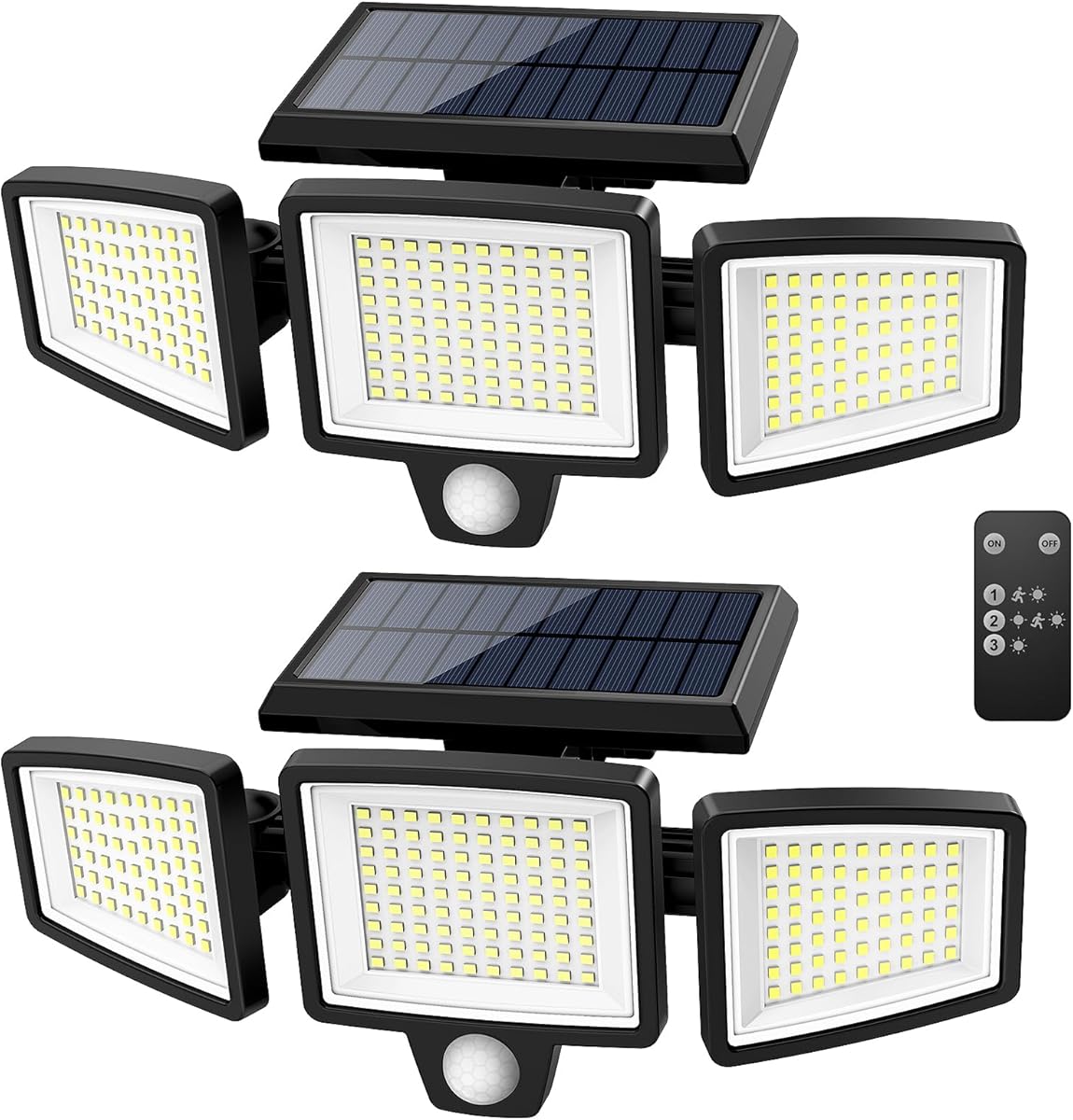
The Tuffenough two-pack combines solar lighting, PIR motion detection, and a wide exterior coverage area in two complete fixtures. It has a 4.4 rating and can illuminate up to 2,500 lumens using 210 LEDs. Rather than sending security alerts to a phone, it provides visible security lighting, making it a practical choice for garages, courtyards, pools, walls, and driveways.
We may earn a commission when you buy through this link, at no additional cost to you.
Each fixture has three adjustable heads and a stated detection range of up to 26 feet across a wide 270-degree angle. The included remote lets users choose among a strong motion-sensitive mode, a dim motion-sensitive mode, and a strong continuous-light mode. This flexibility allows the same product to provide brief illumination when movement is detected or continuous illumination at a chosen level.
Each light uses a 1,800mAh rechargeable battery and a solar panel, so it can operate without wiring or disposable batteries. IP65 protection is stated for outdoor use. Performance still depends on weather and placement: the panel should face direct sunlight, and cloudy or rainy periods may require two to three days of charging. A remote-control mode switch also means adjustments are less convenient than app-based controls.
This is the best pick for a homeowner who wants ready-made outdoor security illumination rather than a sensor that reports to an app. It is less appropriate for monitoring events in real time or integrating with a broader automation system. Use the recommended mounting height and keep the panel unobstructed to achieve the intended detection and charging performance.
The rechargeable battery and integrated panel make these lights convenient for detached walls, sheds, and other locations where running cable is undesirable. Direct sunlight is essential, so shaded locations may require an alternative power source.
Three independently positioned heads can illuminate a wall, yard, driveway, or pool area from a single mounting point. The wide PIR angle and remote-controlled modes make it possible to balance detection coverage with continuous visibility.
We may earn a commission when you buy through this link, at no additional cost to you.
The most useful light sensor depends on whether you need to detect people, measure brightness, identify an opened entry, or automatically control an outdoor fixture. Review the sensing method, ecosystem, power requirements, detection area, and installation process before choosing.
PIR sensors detect changes in infrared energy and are well suited to movement through rooms and hallways. mmWave radar can identify both moving and stationary human presence, making it more appropriate for nuanced occupancy controls. Photoelectric sensors measure ambient light but do not identify a person, while magnetic contacts report whether a door or window has been opened. Choose based on the event you actually need to monitor rather than treating every light-related detector as an interchangeable security device.
Some sensors require a manufacturer-specific hub, while others use Amazon Sidewalk, Wi-Fi, Zigbee, or a local automation platform. Pay attention to whether a hub is sold separately, whether the hub needs internet access, and whether the sensor communicates directly with your network. Also check whether voice assistants and third-party platforms are genuinely supported; a product can work within its native app without being compatible with the broader ecosystem you use.
A generous maximum range does not always produce useful coverage in a real room. Obstacles, furniture, reflective surfaces, and the sensor's orientation can reduce effective detection. Adjustable sensitivity, selectable distance settings, and a rotatable body are often more valuable than headline range. For large rooms, position sensors in corners or central high points, but avoid aiming them directly at windows, moving curtains, heating equipment, or busy traffic areas.
Battery devices are easier to place but need periodic maintenance, while hard-wired photocells offer continuous operation but require safe electrical installation. Solar lights eliminate wiring and disposable batteries but need direct sunlight. Contact sensors usually use adhesive mounting, whereas hub-based motion sensors may attach magnetically or with adhesive. Consider the selected location, whether you can cut power safely, and whether the mounting surface suits the included hardware.
Security monitoring and lighting automation serve different purposes. A motion detector may send immediate intruder alerts, while a photocell simply activates a fixture at dusk. A hybrid sensor can support both by measuring ambient brightness and detecting movement, and a complete solar light can illuminate without reporting activity. Clarify whether you want real-time phone notifications, remote arming, visual deterrence, energy-saving lighting, or all three before selecting a device.
Indoor sensors should not be assumed to tolerate rain, direct sunlight, or temperature changes. Outdoor products may carry IP44 or IP65 protection, but each rating has a specific meaning. IP44 addresses solid objects and splashing water, while IP65 adds protection against dust and powerful water jets. Match the rating to the exposure, maintain the specified orientation, and follow local electrical guidance when installing hard-wired equipment.
A local-first sensor can process automations on your own hub or Home Assistant installation, while a cloud-connected model may depend on a remote service for full functionality. Wi-Fi isolation, data routing, and account access can matter in a privacy-conscious home. Read the platform requirements carefully and avoid assuming that a sensor is local-only because its protocol or brand name sounds technical. The best system is one whose network behavior fits your expectations.
Battery-life claims depend on event frequency, temperature, signal quality, and the device's radio behavior. A sensor in a busy hallway may consume power much faster than one in a rarely used room. Low-battery reporting is valuable, but it should not replace periodic checks. Solar fixtures also require cleaning, unobstructed sunlight, and occasional manual switching to manage charging. Build a maintenance routine into your selection instead of assuming every installation is maintenance-free.
Start by identifying the exact event you want to automate: movement in a hallway, presence in a room, an opened front door, or illumination at dusk. Pair or connect the sensor through its required hub and app, then select a notification or lighting routine that matches the location. Test the sensor before committing to a long-term rule, and begin with moderate sensitivity so unexpected triggers do not create notification fatigue.
Position the unit according to its detection pattern. Mount motion devices high enough to avoid being blocked or bumped, aim them across likely paths of travel, and keep them away from curtains, windows, heating vents, and moving branches. Contact sensors need both parts correctly aligned, while outdoor photocells should have an unobstructed view of the sky. For adjustable solar fixtures, position the panel toward direct sunlight and use the recommended mounting height.
Care for the device according to its power method. Replace depleted batteries with the specified type, clean solar panels and light-permeable sensor surfaces, and inspect weather seals or gaskets on outdoor equipment. Periodically test alerts by triggering the sensor and confirming that the hub, app, lights, and linked security devices respond. If behavior changes after furniture moves or seasons change, revisit sensitivity, range, and orientation rather than immediately replacing the hardware.
It depends on the automation you want. A combined motion and ambient-light sensor can turn lights on only when someone is present and a room is dark, while a contact sensor can report an opened door or window. A basic photocell improves exterior lighting but does not send intrusion alerts or distinguish a person from other movement.
PIR sensors are generally simpler and effective at detecting movement, making them suitable for hallways, entrances, and rooms where occupants are expected to move. mmWave sensors can detect stationary presence and offer more nuanced occupancy control, but they usually cost more and require more specialized setup. Choose PIR for straightforward movement detection and mmWave when remaining still should still count as occupancy.
Some products require a manufacturer hub for pairing, app access, notifications, or automations. The YCA1030 and two-pack photocell switches are exceptions in a practical sense because they operate as hard-wired lighting controls rather than app-based security sensors. Other devices such as the Tapo T100, Litos v3, and YoLink YS7804 explicitly require their respective hubs or platforms.
A dusk-to-dawn sensor reacts to the overall light level and usually switches a fixture on at dusk and off at dawn. A motion sensor reacts to movement and may activate lighting or send an alert. Some products, such as the Akamatis Litos v3 and the first Zigbee option in this guide, combine ambient-light measurement with motion or presence detection.
Aim the sensor away from windows, curtains, heat sources, and busy walkways, then use the lowest sensitivity or range setting that still provides adequate coverage. Pet-aware modes can help in homes with smaller animals. Test the area during different times of day and adjust the mount rather than assuming the maximum detection setting is the most effective configuration.
No. Check the stated IP rating and manufacturer guidance for the exact location. The Hue Outdoor Motion Sensor has an IP44 rating, while the YCA1030 and two-pack photocell switches are listed with IP65 protection. Proper placement, intact gaskets, and correct sealing are still necessary even when a product has a weather-resistance rating.
Test the sensor after installation and at least periodically thereafter, especially after moving furniture, changing automation rules, or replacing a hub or battery. Confirm that the sensor registers movement, that the app sends the intended notification, and that linked lights or alarms respond as expected. Outdoor systems deserve additional checks for dirt, damage, and battery or solar charge.
That depends on the product and its ecosystem. The Philips Hue Outdoor Motion Sensor lists Alexa, Google Assistant, and Apple HomeKit support, while the first Zigbee sensor lists Alexa compatibility but requires the correct hub and setup. Other products are designed for a specific app or platform, so verify current support and account requirements before purchasing.
The strongest overall options serve different needs. The first Zigbee sensor offers an economical combination of PIR and lux sensing for compatible smart homes, the Tapo T100 provides balanced indoor motion detection and notifications, and the Akamatis Litos v3 delivers the most advanced presence-and-light sensing for Home Assistant users.
Prioritize the event you need to detect before choosing a device. Choose a contact sensor for specific entry points, PIR for general movement, mmWave for stationary presence, a photocell for automatic outdoor lighting, or a hybrid model when presence and brightness must work together. Hub requirements, power method, and installation difficulty can matter as much as the detection specifications.
Finally, confirm current product details, platform compatibility, and pricing before ordering. Listings, supported integrations, firmware, and hardware options can change, and a sensor is only as useful as the ecosystem it joins. Review the current listing and documentation carefully so the final selection fits both your security goal and your home's technical setup.